
結論先說
- LangGraph 把記憶明確拆成兩套各司其職的組件:Checkpointer(檢查點) 管「當前這一個對話窗口(
thread_id)聊到了哪一步」,Store(長期存儲) 管「同一個用戶(user_id)打開新窗口也該記住的長期偏好」。 - 上線生產首選開源免費的
langgraph-checkpoint-postgres:無需購買商業託管平台(費用邊界見 /guides/langgraph-pricing-open-source-vs-platform),直接連你們自己的 PostgreSQL 即可支撐多節點無狀態擴容。 - 首次連上空數據庫後必須先調一次
.setup():用於自動創建存放快照與記憶鍵值所需的系統數據表。 - FastAPI 異步生產服務請統一用異步版
AsyncPostgresSaver與AsyncPostgresStore,避免同步數據庫驅動阻塞整個異步事件循環。
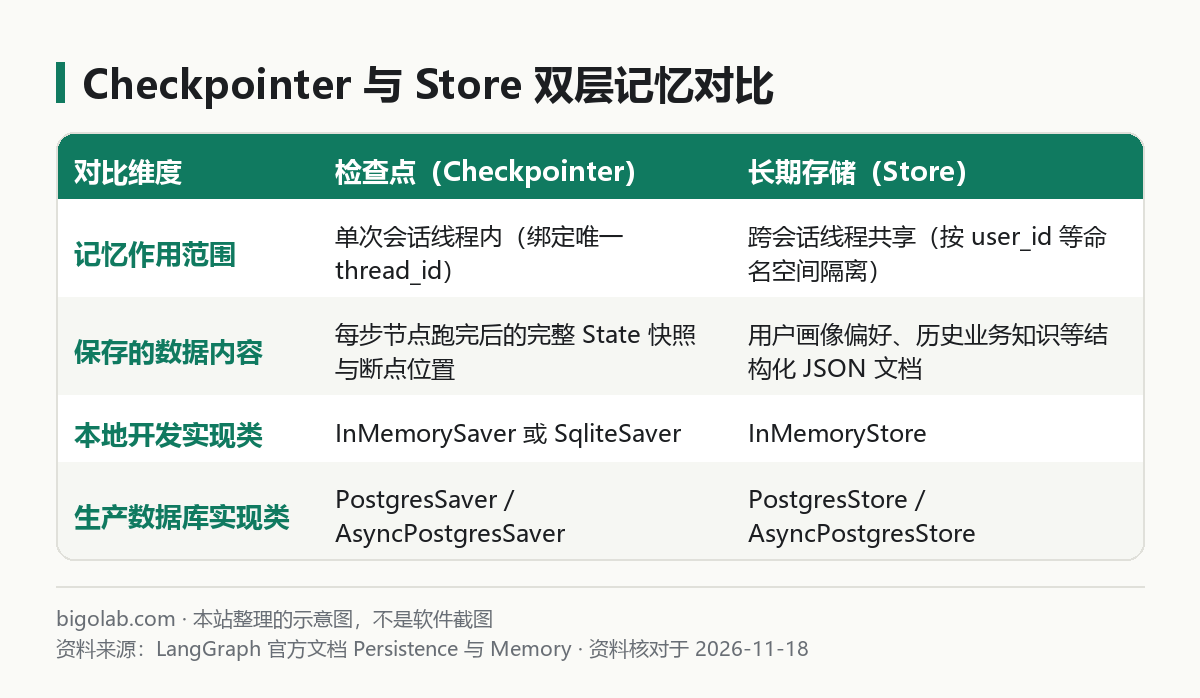
圖:本站根據 LangGraph 官方文檔 Persistence 與 Memory 整理的示意圖
本文根據 LangChain / LangGraph 官方文檔《Persistence》《Memory》與langgraph-checkpoint-postgres倉庫文檔整理,核對日期 2026-11-18。配圖為本站整理的示意圖,不是介面截圖。本站(bigolab.com)不是 LangChain 官方網站。
適用於誰
- 搜「langgraph postgres checkpointer」「langgraph 長期記憶 store」「langgraph 持久化」的後端開發者;
- 在入門示例(見 /guides/langgraph-quickstart-install-first-graph)裏用通了內存儲存器,準備把服務搬上多實例生產容器、解決重啟丟記錄問題的人;
- 發現用戶開一個新對話窗口(換了新
thread_id)後,智能體就把該用戶的老習慣全忘了,想知道怎麼跨會話共享用戶畫像的人。
一、先徹底分清:什麼時候查 Checkpointer、什麼時候讀寫 Store
很多人在做聊天應用時只配了 checkpointer,上線後馬上遇到一個典型尷尬:用戶小張昨天在「會話 A」裏交代過「我是素食主義者、報告一律用表格展示」;今天小張點左上角「新建對話」開啟了「會話 B」(分配了全新的 thread_id),智能體瞬間把這兩條偏好忘得一乾二淨。
原因就在於兩層存儲的鍵維度完全不同:
- Checkpointer(按
thread_id隔離):儲存的是每一次節點跳轉後的完整State快照。它的本職工作是支撐多輪追問、人工審批掛起恢復(見 /guides/langgraph-human-in-the-loop-interrupt-guide)與斷點時間旅行。不同thread_id之間互不可見; - Store(按自定義命名空間如
("memories", user_id)組織):它是一個獨立於具體線程之外的跨會話文檔庫(還可選配向量語義檢索)。無論小張新建多少個聊天窗口,只要節點按他的user_id去store裏查,就能讀出他之前沉澱下來的個人檔案。
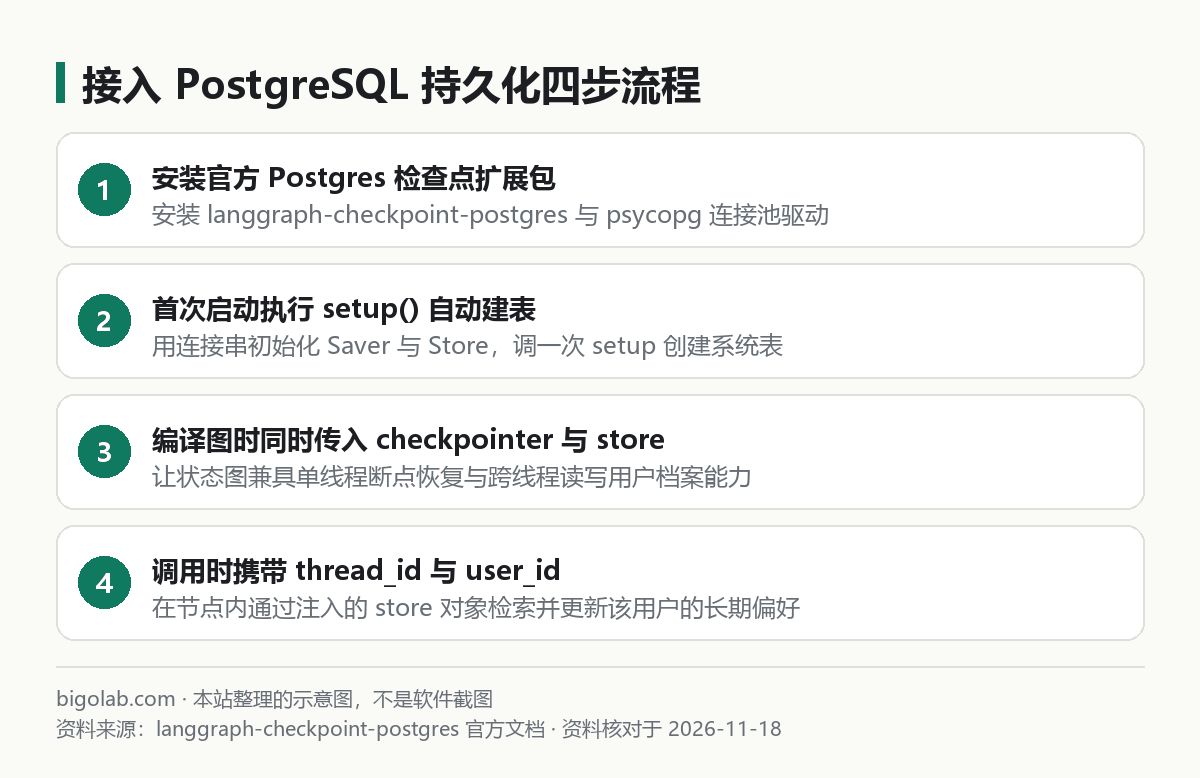
圖:本站根據 langgraph-checkpoint-postgres 官方文檔 整理的示意圖
二、安裝依賴與連接 PostgreSQL 雙層存儲示例
如果你只是在單機寫桌面小工具,裝 langgraph-checkpoint-sqlite 落盤成單個本地文件就夠用;如果是多實例後端服務,直接安裝官方的 PostgreSQL 包與底層 psycopg(v3)驅動:
bash
pip install -U langgraph langgraph-checkpoint-postgres "psycopg[binary,pool]"
下面的異步代碼展示瞭如何同時啟用 AsyncPostgresSaver 和 AsyncPostgresStore,並在節點函數里通過類型註解自動拿到 BaseStore 實例讀寫跨會話記憶:
python
import asyncio
import uuid
from langchain_core.runnables import RunnableConfig
from langgraph.graph import StateGraph, MessagesState, START, END
from langgraph.checkpoint.postgres.aio import AsyncPostgresSaver
from langgraph.store.postgres.aio import AsyncPostgresStore
from langgraph.store.base import BaseStore

DB_URI = "postgresql://postgres:[email protected]:5432/agent_db"

async def chat_node(state: MessagesState, config: RunnableConfig, *, store: BaseStore):
    user_id = config["configurable"]["user_id"]
    namespace = ("user_profiles", user_id)

    # 1. 跨線程讀取該用戶過往儲存的所有長期偏好
    saved_items = await store.asearch(namespace)
    prefs = [item.value.get("note", "") for item in saved_items]

    last_text = state["messages"][-1].content
    # 2. 若用戶本輪明確交代記住某事,寫入跨會話 Store
    if "請記住:" in last_text:
        await store.aput(namespace, str(uuid.uuid4()), {"note": last_text})

    summary = ";".join(prefs) if prefs else "暫無歷史偏好"
    reply = f"已讀取您的跨會話檔案({summary}),收到本輪消息:{last_text}"
    return {"messages": [("assistant", reply)]}

async def main():
    async with (
        AsyncPostgresSaver.from_conn_string(DB_URI) as checkpointer,
        AsyncPostgresStore.from_conn_string(DB_URI) as store,
    ):
        # 首次連接空庫時執行建表遷移(冪等操作)
        await checkpointer.setup()
        await store.setup()

        builder = StateGraph(MessagesState)
        builder.add_node("chat", chat_node)
        builder.add_edge(START, "chat")
        builder.add_edge("chat", END)

        graph = builder.compile(checkpointer=checkpointer, store=store)

        # 會話 1:寫入一條長期偏好
        cfg_thread_1 = {"configurable": {"thread_id": "t-001", "user_id": "u_zhang"}}
        await graph.ainvoke({"messages": [("user", "請記住:報表統一用周度口徑")]}, cfg_thread_1)

        # 會話 2:換了全新的 thread_id,依然能從 store 讀出剛才存下的偏好
        cfg_thread_2 = {"configurable": {"thread_id": "t-002", "user_id": "u_zhang"}}
        out = await graph.ainvoke({"messages": [("user", "幫我生成本週彙總")]}, cfg_thread_2)
        print(out["messages"][-1].content)

if __name__ == "__main__":
    asyncio.run(main())
三、生產環境連接池與 CLI 部署避坑提醒
- 手動建連接池必配兩個參數:
from_conn_string適合快速測試;在長生命週期的 FastAPI 應用生命週期(lifespan)裏自建AsyncConnectionPool時,官方文檔特別強調必須在連接參數裏打開autocommit=True和row_factory=dict_row,否則.setup()建表事務不提交或讀取行字段時報鍵錯誤; - 與
langgraph.json託管模式區分開:如果你是用官方 CLI 服務啟動(配置見 /guides/langgraph-json-config-guide),服務端框架會自動接管底層的checkpointer與store注入,節點函數里照常聲明*, store: BaseStore即可直接用,不需要在compile()時手工傳連接串; - 控制檢查點表體積膨脹:高頻工具循環每走一步都會寫一行快照,對已經完結超過幾十天的陳舊臨時會話,建議定期按
thread_id清理歸檔。日常用大模型輔助編寫數據庫清理腳本或排查連接池異常時,個人官方訂閱說明也可參考 /chongzhi/chatgpt-plus。
常見問題
Q:Store 支持按自然語言語義搜尋幾百條歷史記憶嗎?
支持。在初始化 PostgresStore(或 InMemoryStore)時傳入 index={"embed": 嵌入模型, "dims": 向量維度} 並確保 PostgreSQL 開啟了 pgvector 擴展後,store.asearch(namespace, query="飲食習慣") 就會自動執行向量相似度檢索,只召回最相關的幾條記憶省下上下文。
Q:報 psycopg.OperationalError 連不上本地數據庫怎麼查?
先確認連接串裏的端口、庫名是否已提前手動 CREATE DATABASE agent_db;(.setup() 只負責在已有庫內建表,不會替你新建數據庫本身),並核對密碼含特殊符號時是否做了 URL 編碼。
相關教學
- /guides/langgraph-quickstart-install-first-graph:LangGraph Python 安裝與基礎
InMemorySaver用法 - /guides/langgraph-human-in-the-loop-interrupt-guide:依賴 Checkpointer 實現人工審批掛起與恢復
- /guides/langgraph-pricing-open-source-vs-platform:自建開源 PostgreSQL 持久化與商業平台對比
- /guides/langgraph-json-config-guide:
langgraph.json服務端配置詳解
參考資料
- LangChain / LangGraph 官方文檔:Persistence & Memory Store — https://docs.langchain.com/
langchain-ai/langgraph官方 GitHub 倉庫 — https://github.com/langchain-ai/langgraph
0 條評論
還沒有評論,來搶沙發~