
本文根據 OpenAI 官方《Counting tokens》整理,資料核對於 2026-11-05。配圖為本站整理的示意圖,不是介面截圖。代碼裏的模型名取自官方當天示例,請以官方模型頁為準。本站(bigolab.com)不是 OpenAI 官方網站。API 是按用量計費的獨立服務,與 ChatGPT 訂閱分開計算,Key 的獲取見 /guides/openai-api-key。
適用於誰
- 想在發請求之前知道提示詞會佔多少 token 的開發者;
- 做預算、想估算一次調用大概多少錢的人;
- 發現
output_tokens比螢幕上看到的文字多,想弄明白為什麼的人。
結論先說
- token 是模型處理文本的計量單位,計費和上下文限制都按它算。
- 官方提供了專門的計數接口:
POST /v1/responses/input_tokens,參數和responses.create一樣,返回這個請求會用多少輸入 token。 - 本地分詞器只適合純文本。 官方說圖片和文件它不支持,“字符數除以 4”這類估算不準,工具定義和 schema 的額外 token 也很難本地數清。
- 計數包含格式化 token,比如消息的角色和邊界,所以會比你只對正文分詞的結果多。
- 輸出 token 可能比你看到的多:官方說計入的是模型生成的全部 token,包括不可見的。
- 費用 = 用量 × 單價,單價以官方價格頁當天為準,見 /guides/openai-api-price-official-table。
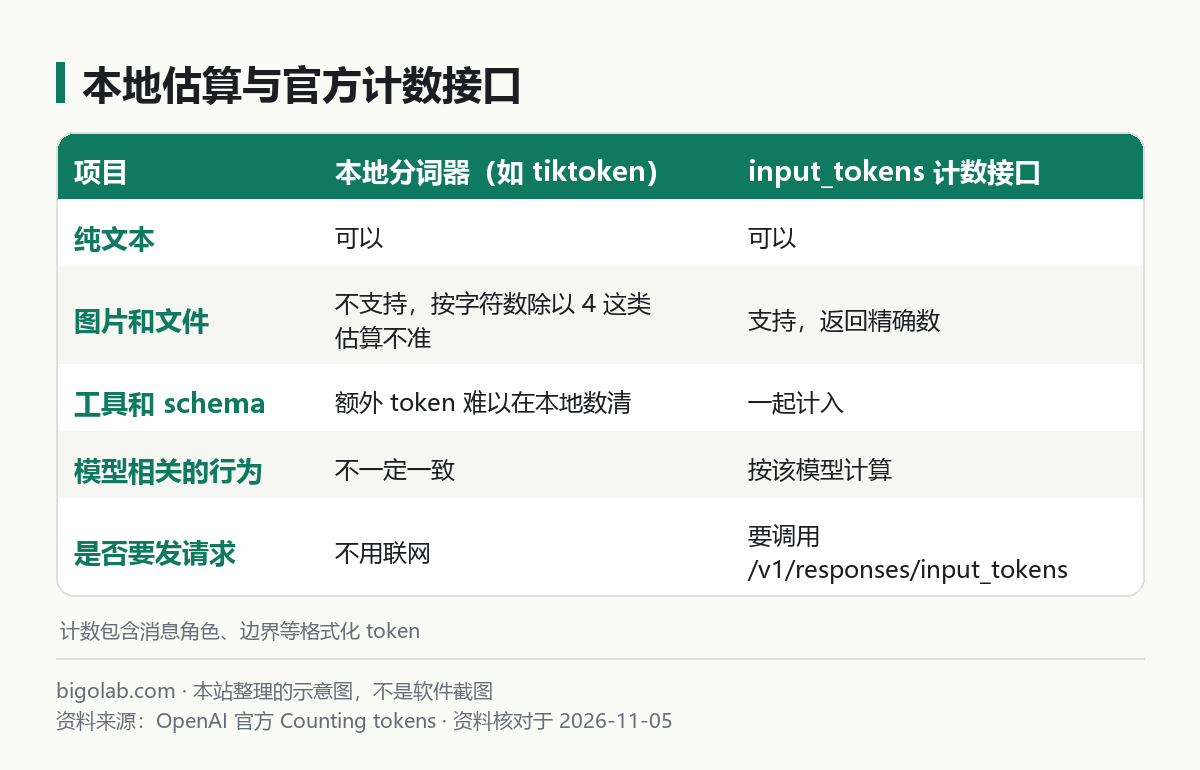
圖:本站根據 OpenAI 官方《Counting tokens》 整理的示意圖
一、用計數接口數輸入 token
Python(先 pip install openai,密鑰設定見 /guides/openai-api-python-quickstart):
python
from openai import OpenAI

client = OpenAI()

response = client.responses.input_tokens.count(
    model="gpt-6-astra",  # 以官方模型頁當天為準
    input="Tell me a joke.",
)
print(response.input_tokens)
Node.js(儲存為 .mjs):
javascript
import OpenAI from "openai";

const client = new OpenAI();

const response = await client.responses.inputTokens.count({
  model: "gpt-6-astra", // 以官方模型頁當天為準
  input: "Tell me a joke.",
});

console.log(response.input_tokens);
官方說,這個接口接受和 Responses API 相同的輸入格式:文字、消息、圖片、文件、工具、對話都可以傳,返回的是模型實際會收到的精確數量。所以最穩妥的用法是:把你準備發給 responses.create 的那份參數原樣拿來調用 count。
帶系統指令和多輪對話
指令用 instructions,多輪對話用消息數組,都和正式請求一樣:
python
response = client.responses.input_tokens.count(
    model="gpt-6-astra",
    instructions="You are a helpful assistant that explains concepts simply.",
    input=[
        {"role": "user", "content": "What is 2 + 2?"},
        {"role": "assistant", "content": "2 + 2 equals 4."},
        {"role": "user", "content": "What about 3 + 3?"},
    ],
)
print(response.input_tokens)
帶圖片
圖片按尺寸和 detail 檔位折算 token。官方說計數接口返回精確數,不需要猜;圖片可以用 file_id,也可以用 image_url(網址或 Base64 數據 URL)。傳圖方式見 /guides/openai-api-image-input。
javascript
const response = await client.responses.inputTokens.count({
  model: "gpt-6-astra",
  input: [
    {
      role: "user",
      content: [
        { type: "input_image", image_url: "https://example.com/chart.png", detail: "auto" },
        { type: "input_text", text: "Summarize this chart." },
      ],
    },
  ],
});
帶工具
函數 schema、MCP 伺服器這類工具定義也會佔上下文,官方建議把它們和輸入一起數。函數定義怎麼寫見 /guides/openai-api-function-calling:
python
response = client.responses.input_tokens.count(
    model="gpt-6-astra",
    tools=[
        {
            "type": "function",
            "name": "get_weather",
            "description": "Get the current weather in a location",
            "parameters": {
                "type": "object",
                "properties": {"location": {"type": "string"}},
                "required": ["location"],
            },
        }
    ],
    input="What is the weather in San Francisco?",
)
print(response.input_tokens)
帶文件
官方說文件輸入目前支持 PDF,可傳 file_id、file_url 或 file_data,和 responses.create 一樣;計數反映模型完整處理後的輸入。
二、為什麼不能只用 tiktoken
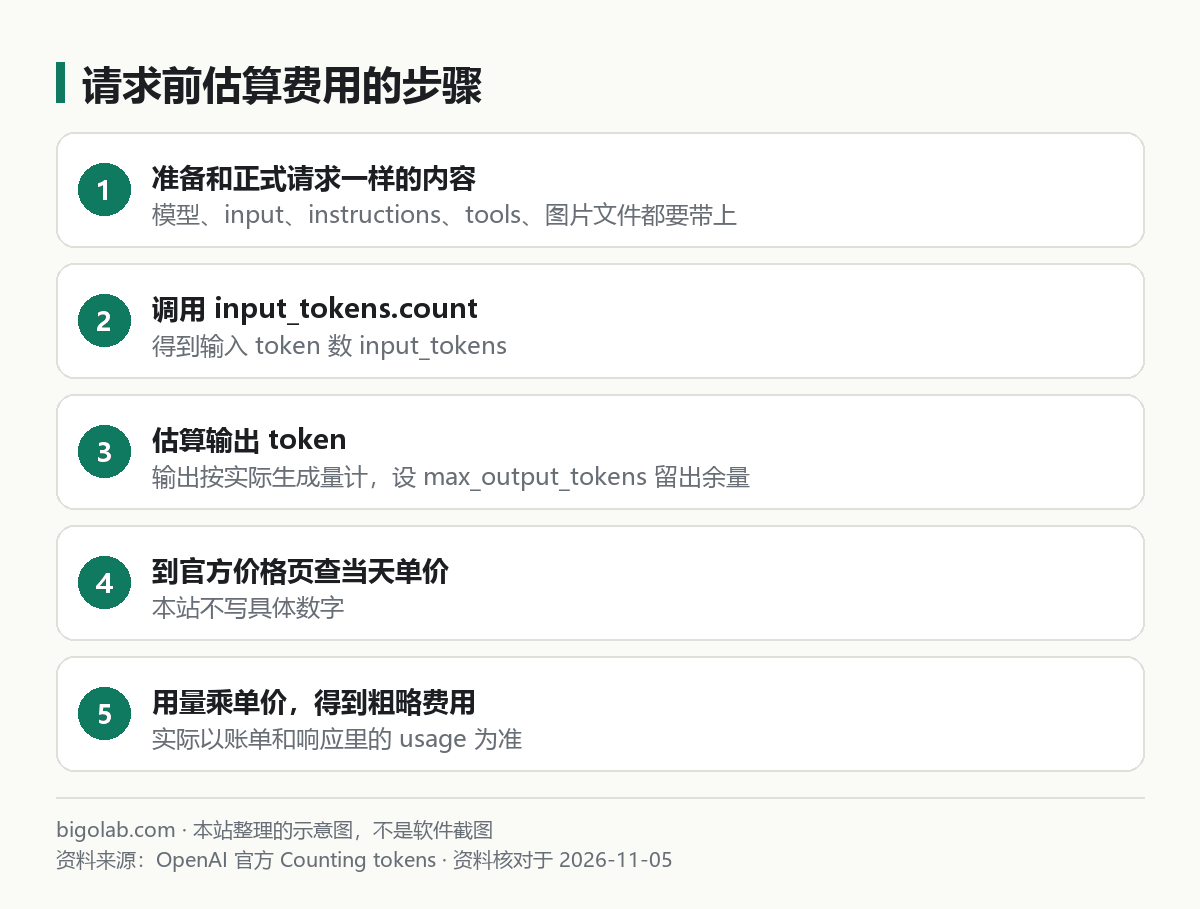
圖:本站根據 OpenAI 官方《Counting tokens》 整理的示意圖,步驟順序為本站歸納
tiktoken 是 OpenAI 的分詞庫,適合在本地快速數純文本。官方的向量嵌入文檔給了示例:
python
import tiktoken

def num_tokens_from_string(string: str, encoding_name: str) -> int:
    encoding = tiktoken.get_encoding(encoding_name)
    return len(encoding.encode(string))

print(num_tokens_from_string("tiktoken is great!", "cl100k_base"))
官方在向量模型那一頁說,第三代向量模型(如 text-embedding-3-small)用 cl100k_base 編碼,向量的用法見 /guides/openai-api-embeddings。至於聊天模型該用哪種編碼,官方這幾頁沒有寫,本文不下結論。
計數接口那頁列出了本地分詞的三個侷限:
- 圖片和文件不被支持,用“字符數除以 4”估算是不準的;
- 工具和 schema 會增加難以在本地數清的 token;
- 模型相關的行為(官方舉例:推理、緩存)可能改變分詞。
所以有圖片、文件、工具時,用計數接口;只是純文本、要離線粗算,才用 tiktoken。
三、輸出 token:比你看到的多
官方在「Understand output token counts」裏說明:
- 報告的輸出 token 用量包括模型生成的所有 token,不只是響應裏看得見的文字;
- Responses API 裏這個總數叫
output_tokens,Chat Completions 裏叫completion_tokens; - 一些模型(官方點名包括 GPT-5 系列)會生成用於格式化或分隔響應通道、工具調用等結構的 token,這些 token 不出現在消息內容或
logprobs裏,也不一定單獨列出。因此報告的輸出 token 可能高於可見 token,即使reasoning_tokens是 0; max_output_tokens和max_completion_tokens限制的是模型生成的所有 token,包括不可見的。不可見 token 的數量隨模型和響應形態而變,不要假設固定差值;需要特定長度的可見輸出時,給限制留出餘量。
這就解釋了一種常見的困惑:“我只讓它回一句話,為什麼 output_tokens 比字數多?”以及“max_output_tokens 設得剛好夠,輸出卻被截斷”。後一種情況的處理,參見 /guides/openai-api-structured-outputs 裏 incomplete 狀態的判斷。
四、怎麼估算一次調用的費用
本站歸納的流程(價格數字請自行到官方頁面取,本文不寫):
- 用計數接口,傳和正式請求完全相同的內容,得到
input_tokens; - 估算輸出:輸出按實際生成的量計,估一個上限並用
max_output_tokens限制,同時留出餘量; - 到官方價格頁查當天的輸入、輸出單價,見 /guides/openai-api-price-official-table;
- 費用大致 = 輸入 token × 輸入單價 + 輸出 token × 輸出單價;
- 緩存、批處理等折扣會讓實際費用不同,最終以響應裏的
usage和帳單為準,帳單入口見 /guides/openai-api-pricing-billing。
批量任務想省錢,可以看 /guides/openai-api-batch 裏官方寫明的折扣規則。
常見問題
Q:計數接口本身收費嗎?
官方這一頁沒有寫它的計費情況,本文不下結論,請以官方價格頁和 API 參考為準。
Q:計數接口返回的和帳單一致嗎?
官方說返回的是“模型會收到的精確數量”,指的是輸入。實際帳單還包括輸出 token,以及緩存等因素,以帳單為準。
Q:圖片到底算多少 token?
官方圖片頁說明了不同模型的計算規則,並提供了 Image input cost calculator,詳見 /guides/openai-api-image-input。
參考資料
- OpenAI 官方:Counting tokens — https://developers.openai.com/api/docs/guides/token-counting
- OpenAI 官方:Vector embeddings — https://developers.openai.com/api/docs/guides/embeddings
0 條評論
還沒有評論,來搶沙發~