
本文根據 Claude 幫助中心的《Paid plan billing FAQs》《Cancel your Pro or Max subscription》《Request a refund for a paid Claude plan》《Understanding your Pro or Max plan invoices》和用量額度、手機應用訂閱文章整理,資料核對於 2026-10-24。圖為本站整理的示意圖。以官方頁面和應用商店顯示的為準。
適用於誰
- 在 Claude 手機應用裏用蘋果內購或 Google Play 訂閱,想知道怎麼管理的人;
- 搜「claude 訂閱 google pay」,想知道能不能用 Google Pay 付款的人;
- 手機訂閱後想取消、退款、找發票的人。
網頁訂閱的取消和退款,見 /guides/claude-cancel-subscription-refund;發票,見 /guides/claude-invoice-receipt-download。
結論先說
- 手機應用裏的訂閱是應用內購買:官方說明,在 iOS 和 Android 應用裏點頭像、進設定、點 Upgrade to Pro,按提示完成應用內購買。這時收款的是蘋果 App Store 或 Google Play,不是 Anthropic。
- 關於 Google Pay:官方沒有提到這個名字。 官方只說,網頁訂閱只接受信用卡或借記卡,應用訂閱則使用蘋果或 Google 提供的支付方式。你能用什麼付款,以 Google Play 結帳頁顯示的為準。
- 取消要在訂閱的平台上做:應用裏點頭像 → Billing → Manage subscription;如果已經刪了應用,用蘋果或 Google 官方的訂閱管理方式取消。
- 退款分渠道:蘋果的扣款 Claude 客服無法退,要向蘋果申請;Google Play 的由 Claude 客服核對資格。
- 發票和收據由蘋果或 Google 開,不在 Claude 帳號裏。
- 需要新開通、而又想用網頁訂閱的,可以看本站的 /chongzhi/claude-pro。
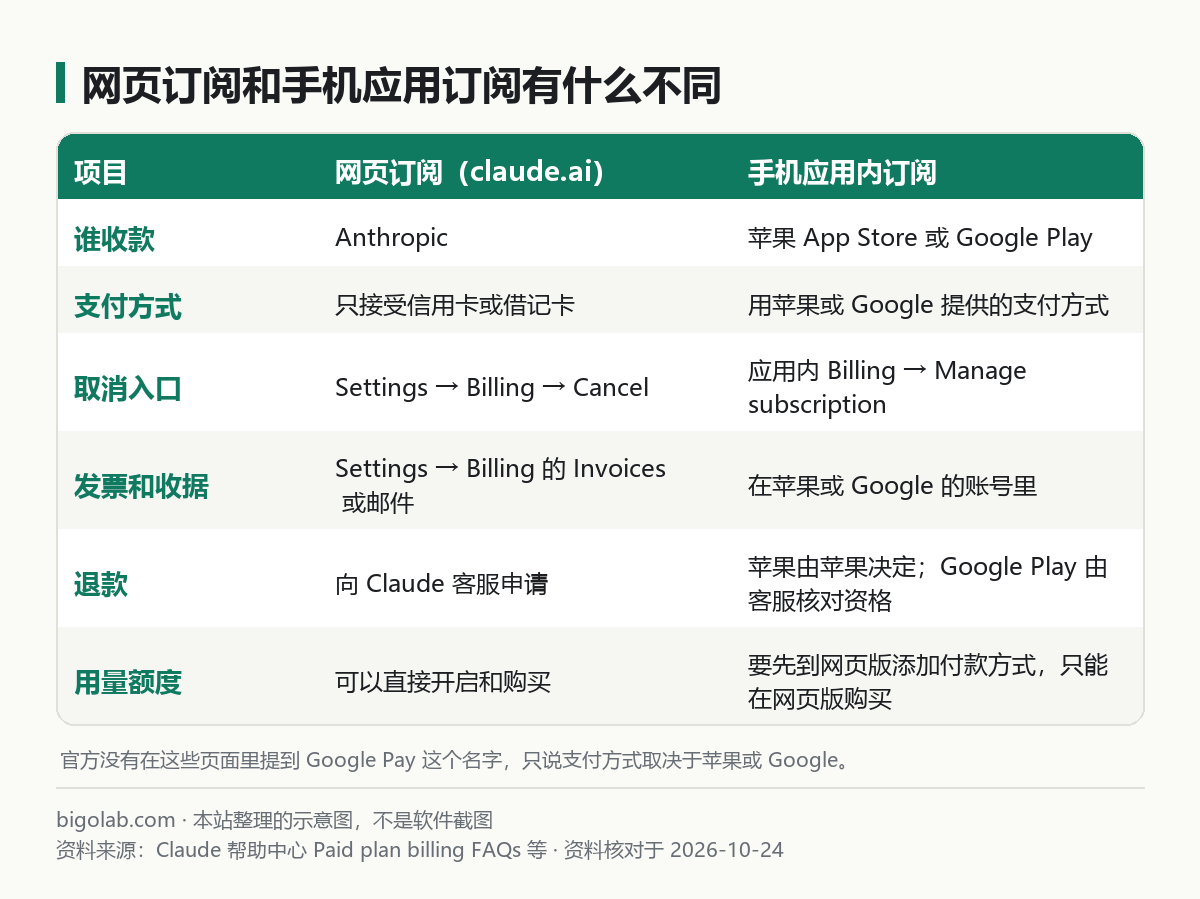
圖:本站根據 Claude 幫助中心:Paid plan billing FAQs 等整理的示意圖
一、怎麼在手機應用裏訂閱
官方的步驟(iOS 和 Android 相同):
- 打開 Claude 應用;
- 點右上角你的頭像或首字母;
- 在設定頁點 Upgrade to Pro;
- 按支付提示完成應用內購買。
官方這兩篇文章沒有寫價格、具體支付方式,也沒有寫如何管理、升降級、恢復購買。官方《What is the Pro plan?》只說:價格見 claude.ai/upgrade 或你所在地區應用商店裏顯示的價格;Pro 在美國是每月 20 美元,各地區價格不同,有的含稅、有的結帳時加稅。官方對 Max 的說明還提到,應用商店裏的價格可能與網頁訂閱價不同,具體見 /guides/claude-pro-vs-max-difference。
二、怎麼取消
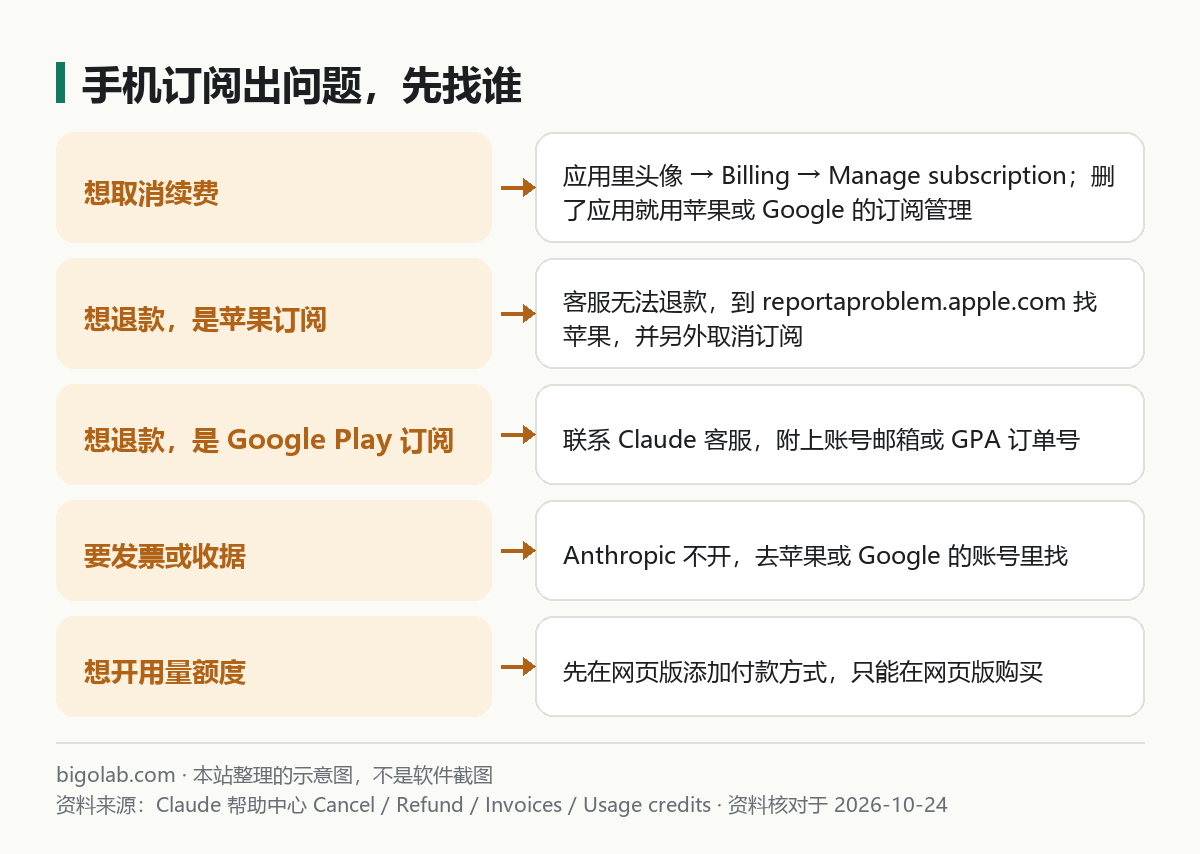
圖:本站根據 Claude 幫助中心 的取消、退款、發票、用量額度文章整理的示意圖
官方《Cancel your Pro or Max subscription》:
- iOS:打開 Claude 應用,點右上角頭像,選 Billing,選 Manage subscription,按提示取消;如果已經刪了應用,用蘋果官方「取消訂閱」說明操作;
- Android:同樣是頭像 → Billing → Manage subscription;如果已經刪了應用,用 Google 官方「在 Google Play 取消、暫停或更改訂閱」說明操作;
- 取消在當前計費週期結束時生效,官方建議在下次扣費前至少 24 小時取消。
三、怎麼退款
官方《Request a refund for a paid Claude plan》:
- 蘋果(iOS):由蘋果處理付款,Claude 客服無法查看或退款。要用購買時的蘋果帳號登入 reportaproblem.apple.com,選 I'd like to → Request a refund,選原因,選你的 Claude 訂閱,提交。是否退款由蘋果決定。申請退款不等於取消訂閱,要另外取消,否則還會繼續扣款;
- Google Play(Android):訂閱仍有效時,聯絡 Claude 客服,由客服核對資格,首條消息裏寫清細節;訂閱已失效時,用 Google Play 綁定的電郵,或 GPA 訂單號(在 Google Play 收據上,形如 GPA.xxxx-xxxx-xxxx-xxxxx)聯絡客服。退款可能要幾天才到帳。
退款的總原則(付款一般不可退,歐洲經濟區和英國 14 天內可申請,按用量折算)見 /guides/claude-cancel-subscription-refund。
四、發票和收據
官方《Understanding your Pro or Max plan invoices》說明:通過 iOS 或 Android 應用訂閱的,Anthropic 不開發票,由蘋果 App Store 或 Google Play 向你收費,收據在你的應用商店帳號裏。發票上要不要寫公司名、稅號,官方沒有說明應用商店訂閱怎麼處理,請向蘋果或 Google 確認。
五、手機訂閱怎麼開用量額度
官方《Extra usage / Manage usage credits for paid Claude plans》說明:如果你是通過 iOS 或 Android 應用訂閱的,只能在 Claude 網頁版上啟用和購買用量額度,並且要先在網頁上添加付款方式。額度怎麼算見 /guides/claude-code-pro-max-or-api 和 /guides/claude-usage-limits。
六、想從應用訂閱換成網頁訂閱
官方沒有寫「直接遷移」的功能。官方幫助中心寫明的相關事實是:帳單日不能直接改,可以取消當前訂閱後在想要的日期重新訂閱;換訂閱幣種也需要先設為到期取消、等週期結束再重新購買。所以如果想從應用訂閱換成網頁訂閱,思路是:在應用商店取消續費,等當前週期結束,再到網頁上重新訂閱。具體細節請向官方客服確認。手機應用的其他說明見 /guides/claude-mobile-app。
常見問題
Q:Claude 訂閱能用 Google Pay 付款嗎?
官方頁面沒有提到 Google Pay。應用訂閱走的是 Google Play 的支付,能用什麼方式看 Google Play 結帳頁。
Q:為什麼 App 裏的價格和網頁不一樣?
官方說明應用商店價格可能與網頁價不同,也受地區和稅費影響。
Q:已經退款了,訂閱還在扣嗎?
蘋果的退款申請不會自動取消訂閱,要另外取消;官方明確提醒。
Q:發票哪裏下?
蘋果或 Google 的帳號裏,不在 Claude 帳號裏。
參考資料
- Claude 幫助中心:Paid plan billing FAQs — https://support.claude.com/en/articles/8325618-paid-plan-billing-faqs
- Claude 幫助中心:Cancel your Pro or Max subscription — https://support.claude.com/en/articles/8325617-cancel-your-pro-or-max-subscription
- Claude 幫助中心:Request a refund for a paid Claude plan — https://support.claude.com/en/articles/12386328-request-a-refund-for-a-paid-claude-plan
- Claude 幫助中心:Understanding your Pro or Max plan invoices — https://support.claude.com/en/articles/16607638-understanding-your-pro-or-max-plan-invoices
- Claude 幫助中心:Extra usage for paid Claude plans — https://support.claude.com/en/articles/12429409-extra-usage-for-paid-claude-plans
0 條評論
還沒有評論,來搶沙發~