
本文根据 Claude 官方《Structured outputs》整理,资料核对于 2026-11-05。配图为本站整理的示意图,不是界面截图。代码里的模型名取自官方当天示例,请以官方模型页为准。本站(bigolab.com)不是 Anthropic 官方网站。API 是按用量计费的独立服务,与 Claude 订阅分开计算,Key 的获取见 /guides/claude-api-key-console。
适用于谁
- 要把 Claude 的回答直接存进数据库、喂给下游程序的开发者:抽取字段、分类、打标签;
- 以前靠“请只输出 JSON”加正则兜底,经常解析失败的人;
- 在做工具调用,希望参数百分之百符合 schema 的人(工具基础见 /guides/claude-tool-use-basics)。
结论先说
- 两个功能:JSON 输出(
output_config.format,类型json_schema)约束回答文字;严格工具调用(strict: true)约束工具名和参数。可以单用,也可以同时用。 - 旧的
output_format参数已弃用,改用output_config.format,现在不再需要 beta 请求头。 - SDK 助手能省事:Python 用 Pydantic 加
messages.parse,TypeScript 用 Zod,结果直接是解析好的对象。 - 仍要处理两种异常:
stop_reason为refusal(拒绝,输出可能不符合 schema)和max_tokens(被截断,JSON 可能不完整)。 - schema 只支持一个子集,用了不支持的特性会返回 400。
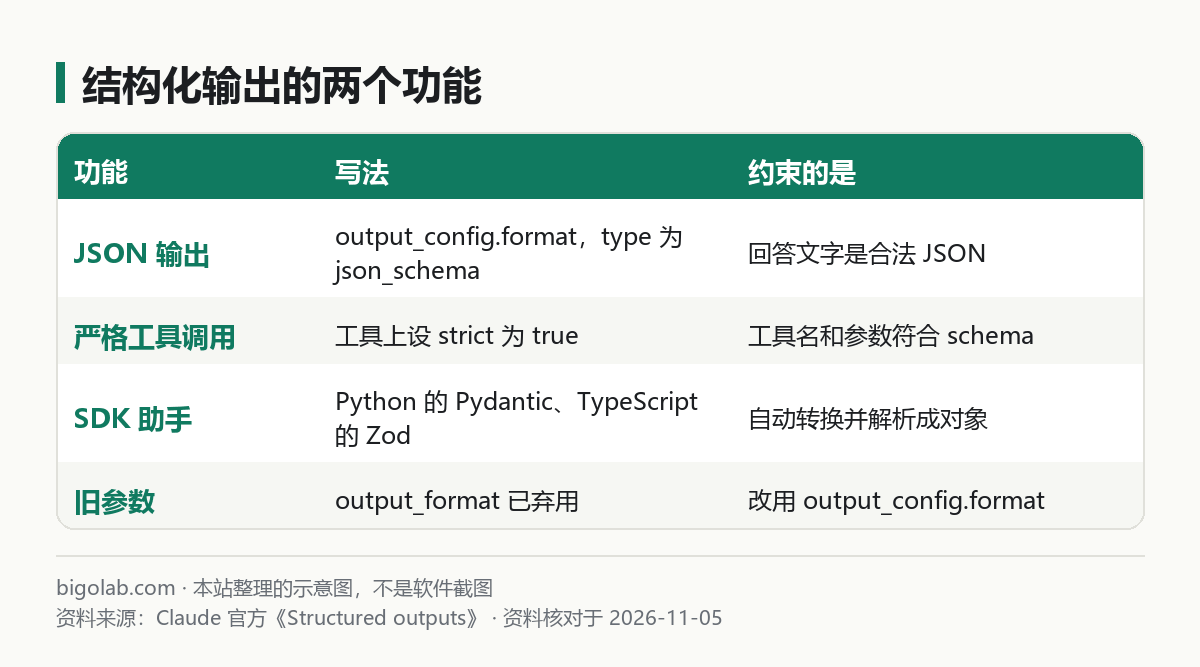
图:本站根据 Claude 官方《Structured outputs》 整理的示意图
一、直接写 JSON schema
Python:
python
import json
import anthropic

client = anthropic.Anthropic()

response = client.messages.create(
    model="claude-opus-5-5",  # 以官方模型页当天为准
    max_tokens=1024,
    messages=[
        {
            "role": "user",
            "content": "提取信息:张三([email protected])想要企业版并预约演示。",
        }
    ],
    output_config={
        "format": {
            "type": "json_schema",
            "schema": {
                "type": "object",
                "properties": {
                    "name": {"type": "string"},
                    "email": {"type": "string"},
                    "plan_interest": {"type": "string"},
                    "demo_requested": {"type": "boolean"},
                },
                "required": ["name", "email", "plan_interest", "demo_requested"],
                "additionalProperties": False,
            },
        }
    },
)

text = next(b.text for b in response.content if b.type == "text")
data = json.loads(text)
print(data)
注意三点:
- 回答在
type为text的内容块里,是一段合法 JSON 字符串,自己json.loads; - 每个对象必须写
additionalProperties: false; - 想要的字段都放进
required,下面讲的属性顺序问题也会因此更好处理。
二、用 SDK 助手:Pydantic 与 Zod
写类比写 schema 更顺手,SDK 会替你转换:
python
from pydantic import BaseModel
import anthropic

client = anthropic.Anthropic()


class ContactInfo(BaseModel):
    name: str
    email: str
    plan_interest: str
    demo_requested: bool


response = client.messages.parse(
    model="claude-opus-5-5",
    max_tokens=1024,
    messages=[{"role": "user", "content": "提取信息:张三([email protected])想要企业版并预约演示。"}],
    output_format=ContactInfo,
)
print(response.parsed_output)注意:messages.parse 这个助手方法的参数仍叫 output_format,传的是类;你直接调用 messages.create 时才用 output_config.format。官方还提醒,Python SDK 1.0 及之后,在 client.beta.messages.create() 里传旧的 output_format={...} 字典会抛 TypeError。
TypeScript 用 Zod:
typescript
import Anthropic from "@anthropic-ai/sdk";
import { z } from "zod";
import { zodOutputFormat } from "@anthropic-ai/sdk/helpers/zod";

const client = new Anthropic();

const ContactInfo = z.object({
  name: z.string(),
  email: z.string(),
  plan_interest: z.string(),
  demo_requested: z.boolean(),
});

const response = await client.messages.parse({
  model: "claude-opus-5-5",
  max_tokens: 1024,
  messages: [{ role: "user", content: "提取信息:张三([email protected])想要企业版并预约演示。" }],
  output_config: { format: zodOutputFormat(ContactInfo) },
});
console.log(response.parsed_output);
不想用 Zod,可以用 @anthropic-ai/sdk/helpers/json-schema 的 jsonSchemaOutputFormat(),把 schema 声明为 as const 还能得到类型推断。
官方说明助手做的转换:去掉不支持的约束(比如 minimum、maxLength)并把它们写进字段说明里;给所有对象补 additionalProperties: false;过滤字符串格式;如果助手带校验,会按原始约束在本地再检查一次返回值。
三、schema 支持什么、不支持什么
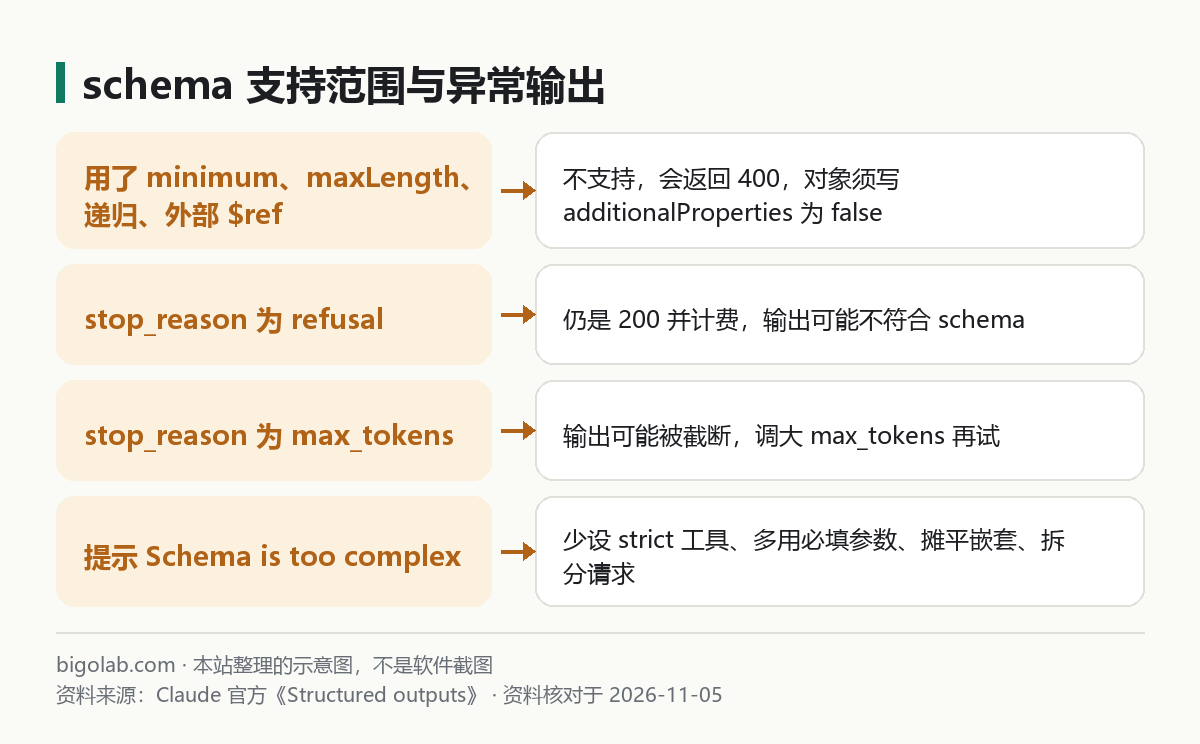
图:本站根据 Claude 官方《Structured outputs》 整理的示意图
支持:object、array、string、integer、number、boolean、null;enum(只能是标量);const;anyOf、allOf(allOf 不能和 $ref 一起用);内部的 $ref、$defs、definitions;required;字符串的一批 format(如 date-time、date、email、uri、uuid 等);数组的 minItems,但只能是 0 或 1。
不支持:递归 schema;复杂类型的 enum;外部 $ref;minimum、maximum、multipleOf;minLength、maxLength;additionalProperties 取 false 以外的值。简单的正则 pattern 可用,但后向引用、环视、\b 不行。用了不支持的特性会返回 400。
四、无效输出的两种情况
即使有 schema 约束,下面两种情况的输出也可能不是你想要的:
stop_reason: "refusal":Claude 出于安全原因拒绝。返回仍是 200,也照常计费,但输出可能不符合 schema。官方还提醒:如果在 schema 里要求“逐步推理”的字段,可能触发reasoning_extraction类的拒绝,改成要“简短解释”更稳;stop_reason: "max_tokens":输出被截断,JSON 可能不完整,把max_tokens调大再试。
另外两个官方提到的细节:枚举值有时只有大小写不同(例如返回 “Conversation Topic 3” 而不是 “Conversation topic 3”),比较时忽略大小写,并避免设计只靠大小写区分的枚举;属性顺序是先必填、后可选,各自按 schema 顺序,如果顺序重要就都设为必填。
五、延迟、缓存与复杂度
- 第一次用一个新 schema 会有编译延迟;编译结果自最后一次使用起缓存 24 小时。改变 schema 结构(或和工具搭配时改变工具集合)会使缓存失效,只改工具的名称或描述则不会;
- 系统会注入一段描述输出格式的提示,多占一些输入 token;
- 更改
output_config.format会使该对话的提示词缓存失效(缓存见 /guides/claude-prompt-caching); - 复杂度限制:每个请求最多 20 个严格工具;所有严格工具和 JSON schema 合计最多 24 个可选参数;最多 16 个联合类型(
anyOf或类型数组)参数。超限会返回 400,信息类似 “Schema is too complex for compilation”,编译超时是 180 秒。降低复杂度的办法:只给关键工具加 strict,参数尽量设为必填,把嵌套对象摊平,把任务拆成多次请求。
六、和别的功能的关系
- 官方 Errors 页写明,Claude 4.6 及之后的模型不支持预填助手消息,会返回 400,官方建议用结构化输出、系统提示或
output_config.format代替; - 批处理可以和结构化输出一起用,官方写明仍享受批量折扣,批量写法见 /guides/claude-api-message-batches;
- token 计数接口也支持,见 /guides/claude-api-count-tokens;
- 和流式、引用等其他功能能不能同时用,官方这一页的兼容性清单我们没读到,请到官方页面核对。
常见问题
Q:为什么返回 400,说 schema 不支持?
对照第三节:多半是用了 minimum、maxLength、递归、外部 $ref,或对象缺了 additionalProperties: false。用 SDK 助手能自动处理一部分。
Q:JSON 还是解析失败?
先看 stop_reason:是 max_tokens 就加大额度,是 refusal 就要处理拒绝的情况。
Q:计费有变化吗?
官方这一页没有单独列出结构化输出的费用,但格式提示会增加输入 token,价格以官方价格页当天为准。
参考资料
- Claude 官方:Structured outputs — https://platform.claude.com/docs/en/build-with-claude/structured-outputs
- Claude 官方:Claude API errors — https://platform.claude.com/docs/en/api/errors
0 条评论
还没有评论,来抢沙发~