
本文根據 DeepSeek 官方 JSON Output 與 Tool Calls 文檔整理,資料核對於 2026-10-24。Beta 功能可能變化,以官方文檔為準。圖為本站整理的示意圖。
適用於誰
- 想讓模型輸出可以直接
json.loads的結果,寫數據提取、分類、表單解析的開發者; - 想讓模型調用自己的函數(查天氣、查訂單、查數據庫)的人;
- 在做 Agent,被「工具調用返回 400」卡住的人。
結論先說
- 兩個模型都支持 JSON Output 和 Tool Calls(官方價格頁功能表)。
- JSON Output 的做法:
response_format設為{"type": "json_object"},提示詞裏必須有「json」字樣並給出期望格式的樣例,max_tokens要夠大。官方提醒:API 有概率返回空的content,可以嘗試修改提示詞緩解。 - Tool Calls 的關鍵:模型不會真的執行函數。它只告訴你「要調哪個函數、參數是什麼」,函數由你來寫、你來執行,再把結果交回去。
- 帶 tools 的思考模式:歷史的
reasoning_content必須完整回傳,否則 400,見 /guides/deepseek-thinking-mode-reasoning-effort。
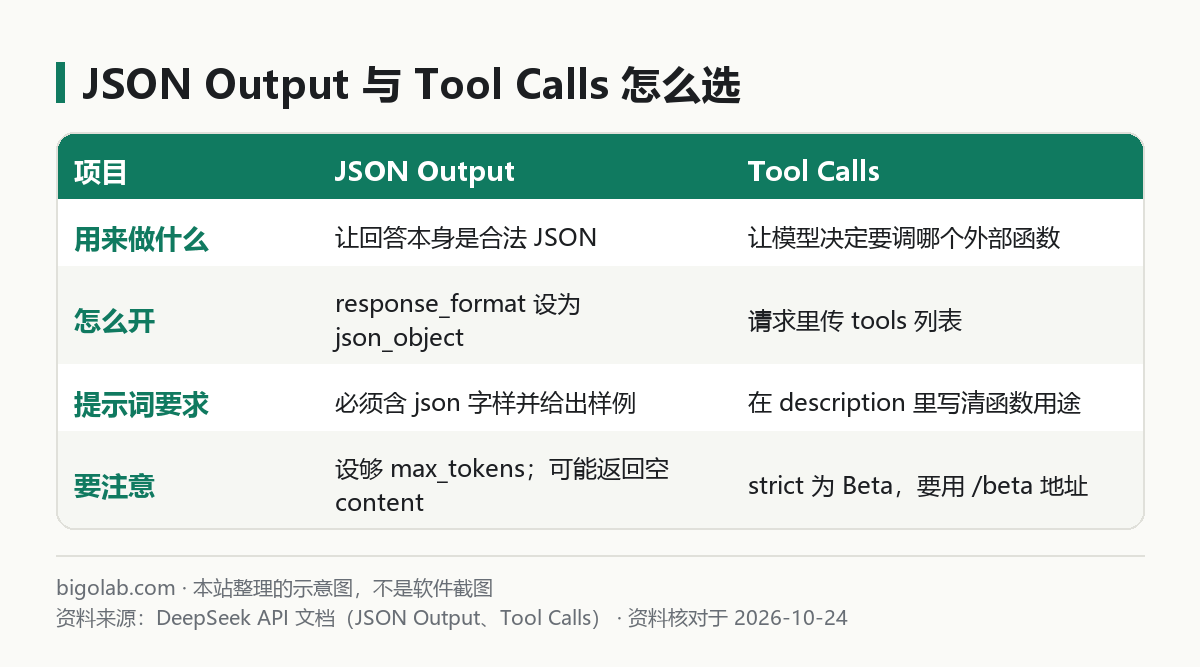
圖:本站根據 DeepSeek 官方 JSON Output 與 Tool Calls 文檔整理的示意圖
一、JSON Output
要點(官方注意事項)
- 設定
response_format={'type': 'json_object'}; - 用戶傳入的 system 或 user 提示詞裏必須含有「json」字樣,並給出希望輸出的 JSON 格式樣例,來指導模型輸出合法 JSON;
- 合理設定
max_tokens,防止 JSON 被中途截斷; - 可能返回空
content,可以嘗試修改提示詞。
官方示例(Python)
python
import json
from openai import OpenAI

client = OpenAI(api_key="<你的 Key>", base_url="https://api.deepseek.com")

system_prompt = """
The user will provide some exam text. Please parse the "question" and "answer" and output them in JSON format.

EXAMPLE INPUT:
Which is the highest mountain in the world? Mount Everest.

EXAMPLE JSON OUTPUT:
{
    "question": "Which is the highest mountain in the world?",
    "answer": "Mount Everest"
}
"""
user_prompt = "Which is the longest river in the world? The Nile River."

response = client.chat.completions.create(
    model="deepseek-flash",
    messages=[{"role": "system", "content": system_prompt},
              {"role": "user", "content": user_prompt}],
    response_format={'type': 'json_object'},
)
print(json.loads(response.choices[0].message.content))
模型會輸出 {"question": "Which is the longest river in the world?", "answer": "The Nile River"}。
實用建議
- 解析前先判斷
content是否為空,為空就重試(可以換個說法再發一次); - 解析失敗時記錄原始返回,便於排查;
- 字段多時在樣例裏把每個字段都寫出來,比只寫文字描述更穩。更通用的結構化輸出做法見 /guides/llm-json-structured-output-reliable。
二、Function Calling(Tool Calls)
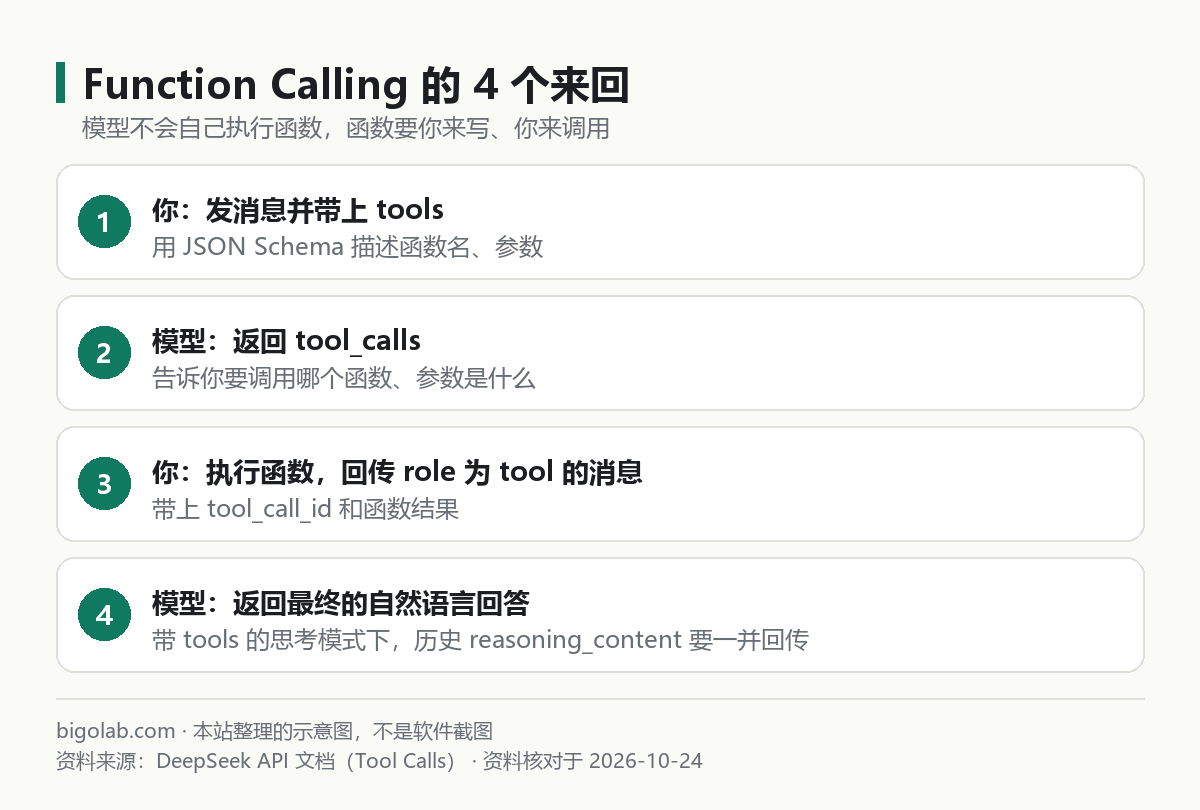
圖:本站根據 DeepSeek 官方 Tool Calls 文檔整理的示意圖
官方示例的流程
官方示例以「獲取天氣」為例:
- 用戶問「杭州現在天氣怎麼樣」,你的請求裏帶上
tools(函數名get_weather,參數location); - 模型返回
tool_calls,內容是調用get_weather({location: 'Hangzhou'}); - 你自己執行
get_weather,把結果以role: "tool"的消息(帶上tool_call_id)追加到 messages,再請求一次; - 模型返回自然語言,比如「杭州現在的氣溫是 24°C」。
官方特別註明:示例裏 get_weather 的功能要由用戶提供,模型本身不執行具體函數。
非思考模式下,官方示例這樣關閉思考:extra_body={"thinking": {"type": "disabled"}}。思考模式下同樣支持工具調用,模型可以在給出最終答案前多輪思考與調用工具;此時要把含 reasoning_content 的整條 message 追加回 messages(messages.append(response.choices[0].message))。
對話中間插入工具調用
有些 Agent 場景要把「不是模型生成的」工具調用及結果插入對話歷史的中間。官方說明:Anthropic API 與 Responses API 支持,也支持在中間插入 system 消息;Chat Completion 接口不支持在中間插入工具調用,但支持插入 system 消息。
三、strict 模式(Beta)
strict 模式下,模型輸出函數調用時會嚴格遵循你定義的 JSON Schema,確保輸出符合定義。要使用它,需要:
- 把
base_url設為https://api.deepseek.com/beta來開啟 Beta; tools列表裏所有 function 都要設定strict: true;- 服務端會校驗你的 Schema,不符合規範或包含不支持的類型會返回錯誤訊息。
官方列出的 strict 模式支持的類型:object、string、number、integer、boolean、array、enum、anyOf。幾條限制:
- object:所有屬性都要設為
required,且additionalProperties必須為false; - string:支持
pattern和format(email、hostname、ipv4、ipv6、uuid),不支持minLength、maxLength; - number / integer:支持
const、default、minimum、maximum、exclusiveMinimum、exclusiveMaximum、multipleOf; - array:不支持
minItems、maxItems; - 還支持
enum、anyOf,以及用$def與$ref複用和定義遞歸結構。
四、常見坑
| 現象 | 原因與辦法 |
|---|---|
| 解析 JSON 失敗,內容被截斷 | max_tokens 太小,調大 |
content 是空的 | 官方說有概率發生;換個提示詞重試 |
| 工具調用後第二次請求 400 | 思考模式下沒有完整回傳 reasoning_content(帶 tools 的請求,之後所有請求都要回傳) |
| strict 報 Schema 錯誤 | 檢查是否用了不支持的參數(如 minLength)、是否缺 required 或 additionalProperties: false |
| 想在 Chat Completion 裏中途插入工具調用 | 不支持,改用 Anthropic 或 Responses 接口 |
其他報錯的含義見 /guides/deepseek-api-error-codes。
常見問題
Q:JSON Output 和 strict 工具調用是同一回事嗎?
不是。前者約束的是回答文本的 JSON 合法性;後者約束的是函數調用的參數符合 Schema。
Q:Claude 的 tool use 能參考嗎?
概念相同,本站有 /guides/claude-tool-use-basics;DeepSeek 的 Anthropic 兼容接口裏 tools、tool_choice 大部分被支持(disable_parallel_tool_use 被忽略)。
Q:Python 完整入門在哪?
見 /guides/deepseek-api-python-quickstart。
想同時用 ChatGPT、Claude 等海外模型做對比?本站提供 AI 會員充值,ChatGPT 可看 Plus 充值。
參考資料
- DeepSeek API 文檔:JSON Output — https://api-docs.deepseek.com/zh-cn/guides/json_mode
- DeepSeek API 文檔:Tool Calls — https://api-docs.deepseek.com/zh-cn/guides/tool_calls
- DeepSeek API 文檔:思考模式 — https://api-docs.deepseek.com/zh-cn/guides/thinking_mode
- DeepSeek API 文檔:模型 & 價格 — https://api-docs.deepseek.com/zh-cn/quick_start/pricing
0 條評論
還沒有評論,來搶沙發~