
結論先說
- 開發 Figma 插件前必須先讓 Codex 理解「雙線程沙箱」隔離。主線程(
code.ts)只能操作畫布節點和變量,不能做文件下載;彈窗 UI(ui.html)負責展示走查報告和觸發 Blob 下載,二者完全靠postMessage交換 JSON。 - **清單必須配
"documentAccess": "dynamic-page",並全部使用Async異步接口*。舊版教學裏的同步讀取方法在新版動態分頁機制下會報錯;讀取本地變量要用figma.variables.getLocalVariablesAsync(),切勿照抄過時代碼。 - 掃描字體和色值時,必須處理
figma.mixed混合值。一個文本框裏只要混用了兩種字號或顏色,node.fontName、node.textStyleId就會返回figma.mixed符號,不先做判斷會直接拋異常。 - 純走查與本地導出類插件應把
networkAccess.allowedDomains設為["none"]。零外網請求既能消除團隊對設計稿泄密的顧慮,也能讓插件在內部安全評審與社區上架時更順暢。 - 用 Codex 迭代插件 TypeScript 邏輯、生成 W3C Design Tokens 轉換器並補齊單測需要穩定額度。國內沒有外幣卡可在本站開通 ChatGPT Plus 自助充值 或配額更高的 ChatGPT Pro 100(10x) 通道,團隊多人研發可直接了解 ChatGPT Business 團隊定製。
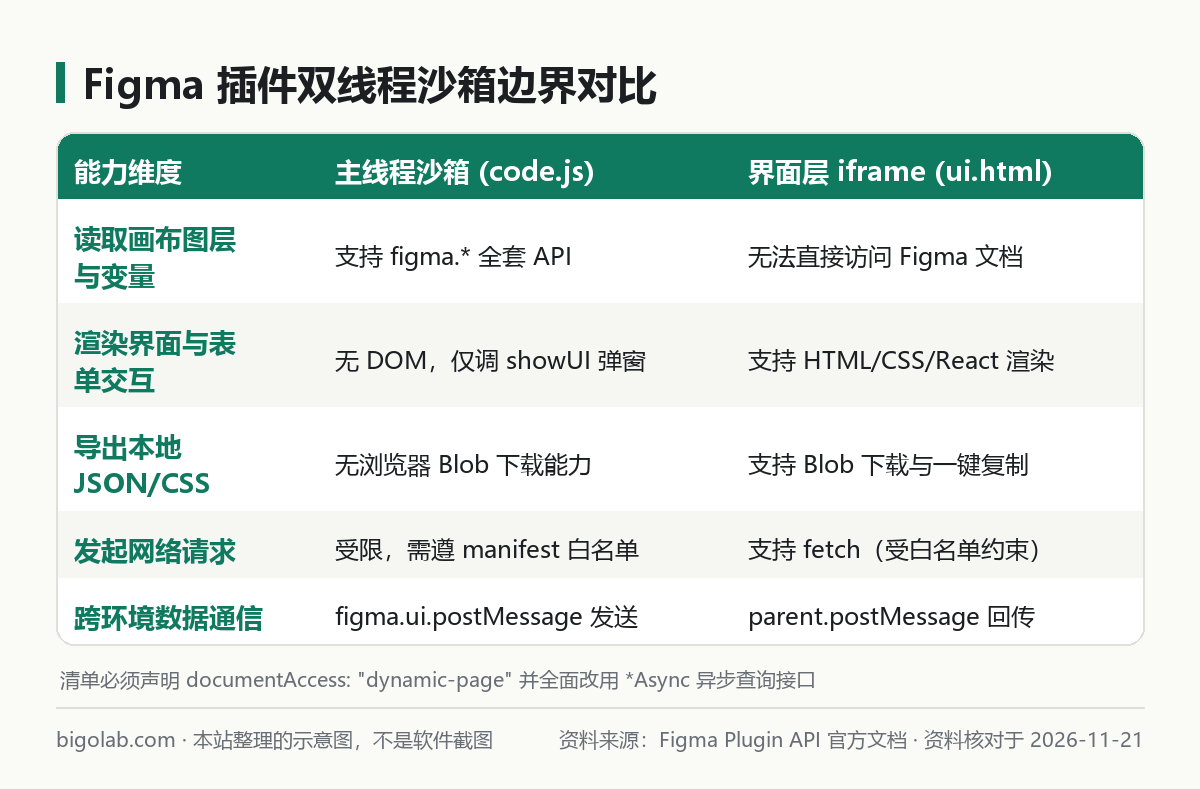
圖:本站根據 Figma Plugin API 官方文檔 整理的示意圖
本文根據 Figma Plugin API 官方文檔(概覽、Manifest、Dynamic Loading、Creating UI)與 OpenAI Codex 文檔整理,資料核對於 2026-11-21。配圖為本站整理的示意圖,不是介面截圖。本站(bigolab.com)不是 Figma 或 OpenAI 官方網站。
適用於誰
- 需要給設計團隊或前端團隊做自動化走查工具,批量找出設計稿中「未綁定色板/未綁變量」和「未命中字號規範」圖層的研發與設計工程人員;
- 想把 Figma 裏的 Local Variables 和 Styles 一鍵導出成標準 Design Tokens(JSON / CSS Variables)供前端代碼庫消費的工程師;
- 用 Codex 寫 Figma 插件時,經常遇到同步 API 報錯、UI 無法下載文件或
figma.mixed類型崩潰的開發者。
一、Figma Plugin 與 Figma MCP 如何分工配合
如果你只是想把某個已經整理好的頁面快速還原成前端組件,可以先看 /guides/codex-figma-mcp-design-tokens-components-to-frontend-code 與 /guides/figma-make-dev-mode-mcp-frontend-codex-workflow。但只要團隊面臨「幾十張畫板裏混着野生顏色」「需要一鍵定位高亮違規圖層」「定期導出標準化 Token 文件提交給前端倉庫」這類高頻動作,在 Figma 裏裝一個自研 Figma Plugin 效率高得多,也能在設計交付前把噪音先清乾淨。
二、五步用 Codex 開發規範走查與 Tokens 導出插件
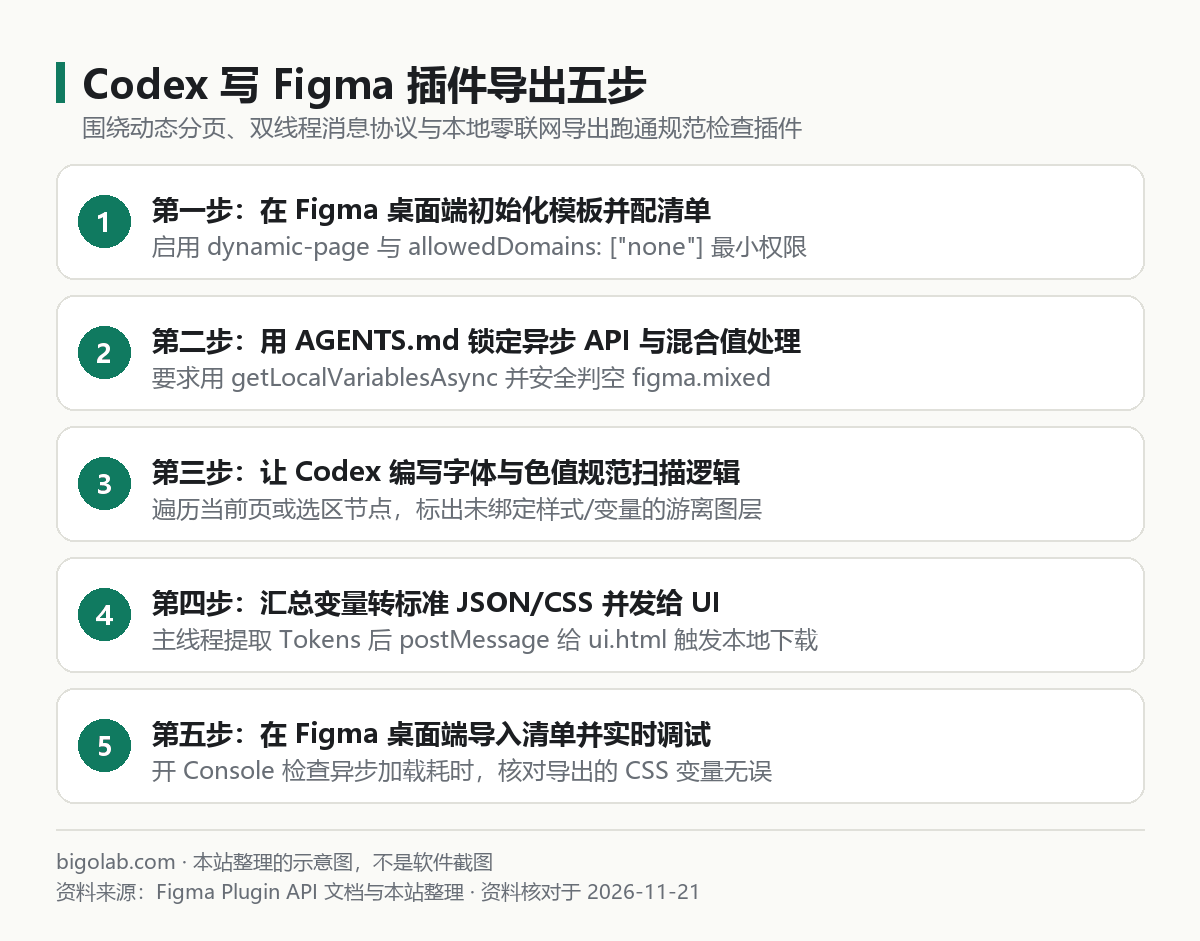
圖:本站根據 Figma 官方 Manifest 與動態分頁文檔 整理的示意圖
第一步:準備最小權限 manifest.json 與 AGENTS.md
在 Figma 桌面端通過 Plugins -> Development -> New plugin 創建帶 UI 的模板,先核對 manifest.json 的核心字段:
json
{
  "name": "Design Audit & Tokens Exporter",
  "id": "your-local-plugin-id",
  "api": "1.0.0",
  "main": "dist/code.js",
  "ui": "dist/ui.html",
  "editorType": ["figma"],
  "documentAccess": "dynamic-page",
  "networkAccess": {
    "allowedDomains": ["none"]
  }
}
接着在倉庫根目錄建立 AGENTS.md(規則讀取機制見 /guides/codex-agents-md-how-it-reads),明確約束 Codex:禁止使用已廢棄的同步變量/樣式接口、遇到 figma.mixed 必須單獨歸類、嚴禁把 window/document 寫進 code.ts。
第二步:讓 Codex 編寫字體與色值規範批量檢查邏輯
預設先掃描當前選區(figma.currentPage.selection),未選中時回退掃描當前頁(figma.currentPage),避免超大文件整庫遍歷造成卡頓:
ts
// src/code.ts(主線程沙箱片段)
interface AuditIssue {
  nodeId: string;
  nodeName: string;
  reason: string;
}

function auditCurrentScope(): AuditIssue[] {
  const roots = figma.currentPage.selection.length > 0
    ? figma.currentPage.selection
    : [figma.currentPage];

  const issues: AuditIssue[] = [];

  const visit = (node: BaseNode) => {
    if (node.type === 'TEXT') {
      const boundText = node.boundVariables?.fontSize;
      if (node.textStyleId === figma.mixed) {
        issues.push({ nodeId: node.id, nodeName: node.name, reason: '文本框混用多種樣式,請拆分為規範樣式' });
      } else if (!node.textStyleId && !boundText) {
        issues.push({ nodeId: node.id, nodeName: node.name, reason: '未綁定文字樣式(Text Style)或字號變量' });
      }
    }

    if ('fills' in node && Array.isArray(node.fills) && node.fills.length > 0) {
      const hasBoundColor = Boolean(node.boundVariables?.fills?.length);
      const hasPaintStyle = 'fillStyleId' in node && node.fillStyleId !== '' && node.fillStyleId !== figma.mixed;
      if (!hasBoundColor && !hasPaintStyle) {
        issues.push({ nodeId: node.id, nodeName: node.name, reason: '填充色未綁定顏色變量或 Paint Style' });
      }
    }

    if ('children' in node) {
      for (const child of node.children) visit(child);
    }
  };

  roots.forEach(visit);
  return issues;
}
還可以讓 Codex 補一個定位消息處理:當設計師在 UI 列表裏點擊某條違規記錄時,主線程收到 nodeId 後調用 await figma.getNodeByIdAsync(nodeId) 並執行 figma.viewport.scrollAndZoomIntoView([target]),一秒跳到問題圖層。
第三步:異步提取 Variables 並轉換成 Design Tokens
通過異步 API 讀取當前文件的 Local Variables 與 Collections,把 RGBA 通道轉為標準十六進制或 CSS 變量結構,打包發送給 UI 層下載:
ts
function rgbaToHex(c: RGBA): string {
  const toHex = (v: number) => Math.round(v * 255).toString(16).padStart(2, '0');
  const alpha = c.a < 1 ? toHex(c.a) : '';
  return `#${toHex(c.r)}${toHex(c.g)}${toHex(c.b)}${alpha}`;
}

async function exportTokensPayload() {
  const [collections, variables] = await Promise.all([
    figma.variables.getLocalVariableCollectionsAsync(),
    figma.variables.getLocalVariablesAsync()
  ]);

  const tokens: Record<string, { $type: string; $value: string | number | boolean }> = {};
  for (const v of variables) {
    const col = collections.find((c) => c.id === v.variableCollectionId);
    const modeId = col?.defaultModeId ?? Object.keys(v.valuesByMode)[0];
    const rawVal = v.valuesByMode[modeId];

    if (v.resolvedType === 'COLOR' && rawVal && typeof rawVal === 'object' && 'r' in rawVal) {
      tokens[v.name] = { $type: 'color', $value: rgbaToHex(rawVal as RGBA) };
    } else if (v.resolvedType === 'FLOAT' && typeof rawVal === 'number') {
      tokens[v.name] = { $type: 'dimension', $value: `${rawVal}px` };
    }
  }
  return tokens;
}
第四步:在 ui.html 接收消息並觸發一鍵導出
在 UI iframe 中監聽 window.onmessage,收到 event.data.pluginMessage 後把 JSON 或生成的 :root { --token: value; } 文本封裝成 Blob,觸發本地 tokens.json / tokens.css 下載,整個過程完全離線完成。如果你想把設計到代碼的整條工具鏈打通,也可結合 /guides/indie-designer-ai-toolchain-chatgpt-figma-mcp-codex-prototype 與 /guides/figma-make-ai-rename-layers-mcp-guide 配合使用。
訂閱與開通提示:讓 Codex 擴展支持多主題 Mode(Light / Dark)變量別名解析、生成 Tailwind v4@theme映射並編寫完整邊界測試時,對話輪次和上下文佔用會快速增長。若基礎檔配額不夠,可在本站查看 ChatGPT Pro 100(10x) iOS 可覆蓋已有 Plus 檔 或適合空白號/到期號的 ChatGPT Pro 5x 信用卡自助通道;長期重度設計工程協同可直接選擇 ChatGPT Pro 20x iOS 通道。
第五步:在 Figma 桌面端加載調試並排查性能
運行 npm run build(推薦配合 esbuild --watch 自動重編),在 Figma 桌面端通過 Plugins -> Development -> Import plugin from manifest... 導入項目清單。打開 Plugins -> Development -> Show/Hide Console 即可實時看報錯,修改代碼儲存後重新運行插件即可驗證。
常見問題
問:為什麼插件一運行就報「Cannot call getLocalVariables with documentAccess: dynamic-page」?
答:這是 Codex 沿用了舊版同步接口導致的。在 dynamic-page 模式下,所有涉及全局樣式、變量與跨頁節點查找的方法都必須換成帶 Async 後綴的版本(如 getLocalVariablesAsync、getLocalTextStylesAsync、getNodeByIdAsync)並加上 await。
問:遇到一個變量引用了另一個變量(Variable Alias)時,為什麼導出代碼拿不到十六進制色值?
答:當 rawVal 是別名對象(type === 'VARIABLE_ALIAS')時,裏面只存了目標變量的 id,不包含 r/g/b 通道。你可以讓 Codex 寫一個帶循環檢測的遞歸解析函數:根據別名 id 在 variables 表中查到引用名,輸出標準 W3C 引用語法 {color.brand.500},或者展開解析出最終顏色值。
問:插件需要把走查結果發給外部接口或把未發佈設計稿發給模型審查,有什麼安全注意事項?
答:未公開產品設計稿、含真實客戶姓名或財務數據的原型圖屬於敏感資產,切勿在未經脫敏與團隊授權的情況下自動上載外部接口。保持 allowedDomains: ["none"] 純本地離線執行是最穩妥的預設方案。
問:國內沒有外幣卡,或者設計研發團隊採購 Codex 對應訂閱需要統一報銷開具增值稅發票,怎麼開通?
答:可訪問本站 AI 會員充值總覽 按用量挑選 ChatGPT Plus 信用卡自助通道、ChatGPT Plus iOS 自助充值 或高頻重度用戶適用的 ChatGPT Pro 20x 信用卡通道;若註冊帳號卡在手機驗證環節,也可了解 Codex 註冊手機驗證服務。本站支持支付寶、微信支付和 AlipayHK,自助卡密兌換無需交出帳號密碼,企業團隊定製採購支持開具增值稅發票;售價以頁面實時標價為準,售後遵循掉訂閱按剩餘天數折退、封號不在質保範圍的標準說明。
相關教學
- Codex 接入 Figma MCP 把設計稿組件、間距與色值還原成前端代碼實戰配置
- Figma Make 與 Figma Dev Mode MCP 聯動實戰:把高保真設計稿直接交付前端與 Codex
- 獨立設計師的 AI 輔助工具鏈:ChatGPT 創意發散、Figma MCP 到 Codex 還原交互原型
- Figma Make / Figma AI 怎麼用:設計稿一鍵變交互原型、自動整理圖層命名與配合 Figma MCP 出代碼
- Codex 怎麼讀 AGENTS.md:全局和項目的讀取順序、override 文件、32 KiB 上限,以及沒生效怎麼排查
參考資料
- Figma 官方開發者文檔:Plugin API Overview — https://developers.figma.com/docs/plugins/
- Figma 官方開發者文檔:Plugin Manifest — https://developers.figma.com/docs/plugins/manifest/
- Figma 官方開發者文檔:Migrating to Dynamic Loading — https://developers.figma.com/docs/plugins/migrating-to-dynamic-loading/
- Figma 官方開發者文檔:Creating a User Interface — https://developers.figma.com/docs/plugins/creating-ui/
0 條評論
還沒有評論,來搶沙發~