
本文根据 Claude Code 官方文档《Configure your terminal》《Automate actions with hooks》《Hooks reference》整理,资料核对于 2026-11-05。配图为本站整理的示意图,不是界面截图。本站(bigolab.com)不是 Anthropic 官方网站。
适用于谁
- 让 Claude Code 跑长任务,想去干别的、做完再被叫回来的人;
- 搜「claude 任务结束时响铃」「claude code hooks 通知 windows」的人;
- 已经配过 Hook,但提醒没出来的人。
Hook 的基本写法已经在 /guides/claude-code-hooks 里整理过,这里专门讲「提醒」这一个用途,并补上 Windows 和终端响铃。
结论先说
- 官方有三条路:①设置项
preferredNotifChannel设成"terminal_bell",让终端响铃;②Notification hook,在 Claude 等你输入或批准时执行命令;③Stop hook,在 Claude 每次回复完毕时执行命令。 - 「做完了」和「等你」是两个不同的事件:Notification 是 Claude 在等输入或权限;Stop 是 Claude 完成回复。想「任务完成就响一下」,Stop 更直接。
- Windows 上官方的 Notification 示例是用
powershell.exe弹一个对话框,不是屏幕角落的通知,对话框可能开在终端窗口后面。 - 终端默认的提醒因终端而异:Ghostty、Kitty、iTerm2 默认发桌面通知(iTerm2 要先开提醒设置),Apple Terminal 默认无声,其他终端默认什么都没有。
- Hook 与内置通知并行,不是替代。
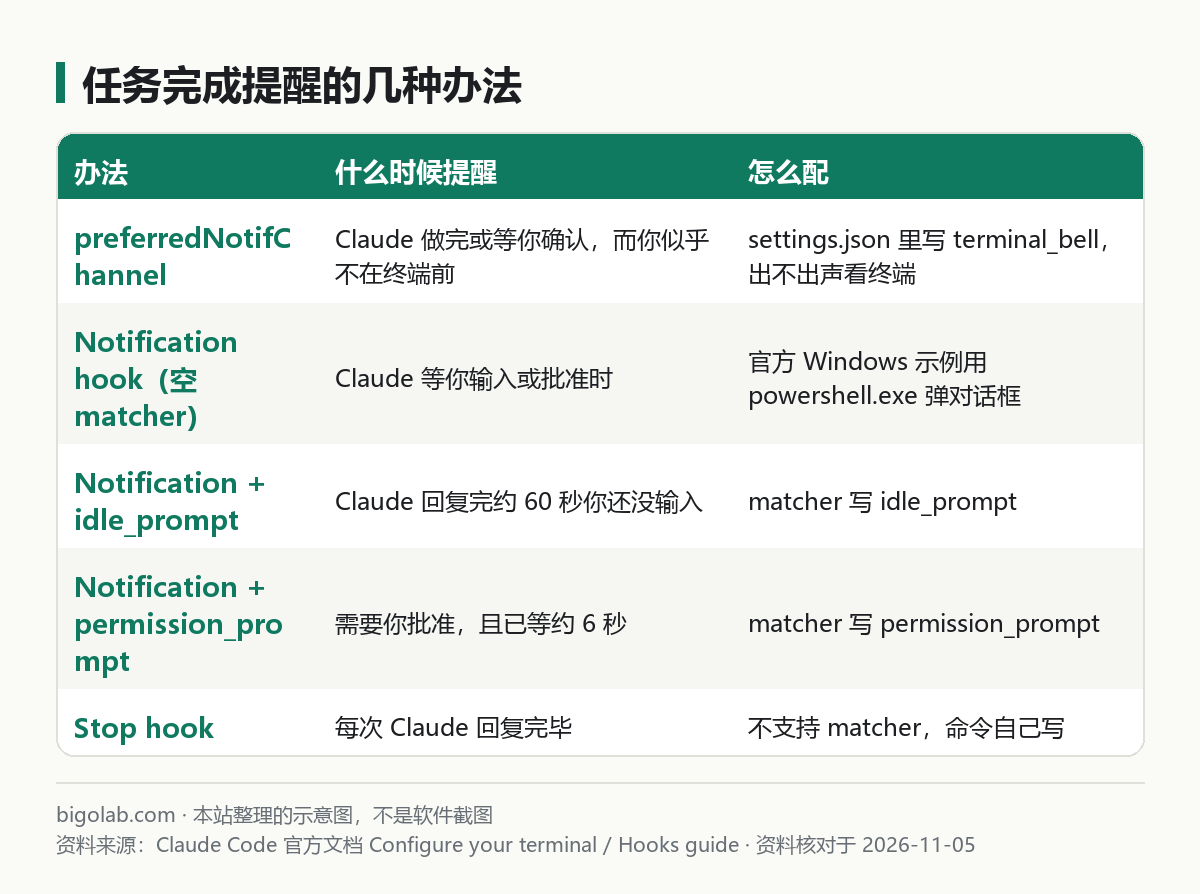
图:本站根据 Claude Code 官方文档:Configure your terminal 与 Automate actions with hooks 整理的示意图
一、最简单:让终端响铃
官方说,Claude 完成任务或停在权限提示上、而你似乎不在终端前时,会触发一个通知事件。默认怎么提醒取决于终端:
- Ghostty、Kitty、iTerm2:桌面通知,iTerm2 要先打开它的提醒设置;
- Apple Terminal:不出声;当前窗口配置里「Audible bell」关着时发一个静默的响铃字符,其他情况什么都没有;
- 其他终端:什么都没有。
要让 Claude Code 不管终端、一律发响铃字符,在 ~/.claude/settings.json(Windows 在用户目录的 .claude 文件夹里)写:
json
{
  "preferredNotifChannel": "terminal_bell"
}
在 Apple Terminal 里还要在 Settings > Profiles > Advanced 打开 Audible bell 才能听到。Windows Terminal 等终端收到响铃字符后会不会发声,官方没有单独说明,取决于终端自己的设置。
二、Notification hook:Claude 等你时弹窗
官方的 Windows 示例写进 ~/.claude/settings.json:
json
{
  "hooks": {
    "Notification": [
      {
        "matcher": "",
        "hooks": [
          {
            "type": "command",
            "command": "powershell.exe -Command \"[System.Reflection.Assembly]::LoadWithPartialName('System.Windows.Forms'); [System.Windows.Forms.MessageBox]::Show('Claude Code needs your attention', 'Claude Code')\""
          }
        ]
      }
    ]
  }
}官方提醒:这条命令打开的是对话框,不是角落里的通知,所以对话框可能开在终端窗口后面;先在 PowerShell 里单独测试这条命令。如果你在 WSL 里跑 Claude Code,powershell.exe 必须能通过 Windows 互操作在 PATH 里找到。macOS 用 osascript,Linux 用 notify-send(需要桌面通知服务,服务器、SSH、容器里通常没有),完整示例见 /guides/claude-code-hooks。
空的 matcher 对所有通知类型生效。只想在特定情况下提醒,把 matcher 设为这些值之一(官方表格的一部分):
| matcher | 什么时候触发 |
|---|---|
permission_prompt | Claude 需要你批准工具使用或沙箱命令的网络请求,且提示已等了约 6 秒 |
idle_prompt | Claude 回复完约 60 秒后,你还没有输入 |
auth_success | 认证完成 |
agent_completed | 后台会话完成或失败,仅在 agent view 打开时触发 |
写完后,在 Claude Code 里输入 /hooks,应该能在 Notification 下看到它。要测试,按 Shift+Tab 切到 manual mode on,让 Claude 做一件需要批准的事,然后切到别的窗口。
三、Stop hook:每次回复完毕时执行
官方对 Stop 的描述是「Claude 回复完毕时」触发,不支持 matcher,每次都触发。配置结构和 Notification 一样,只是事件名换成 Stop,并且可以省略 matcher:
json
{
  "hooks": {
    "Stop": [
      {
        "hooks": [
          {
            "type": "command",
            "command": "powershell.exe -Command \"[console]::beep(800,300)\""
          }
        ]
      }
    ]
  }
}说明:这里的 command 是本文补充的写法,官方文档没有给 Stop hook 的 Windows 示例;[console]::beep 是 PowerShell 里调用系统蜂鸣的通用方法,能不能出声取决于你的电脑和系统设置。想弹窗而不是响铃,可以把命令换成上面官方的 MessageBox 写法。
注意 Stop 每个回合都会触发,包括你随手问一句得到的短回答,不想被频繁打扰就用 Notification 加 idle_prompt。Hook 的更多限制,比如 Stop hook 用退出码 2 会让 Claude 继续而不是停下,见官方 Hooks 参考页,这里不展开。
四、提醒没出来,按这几处查
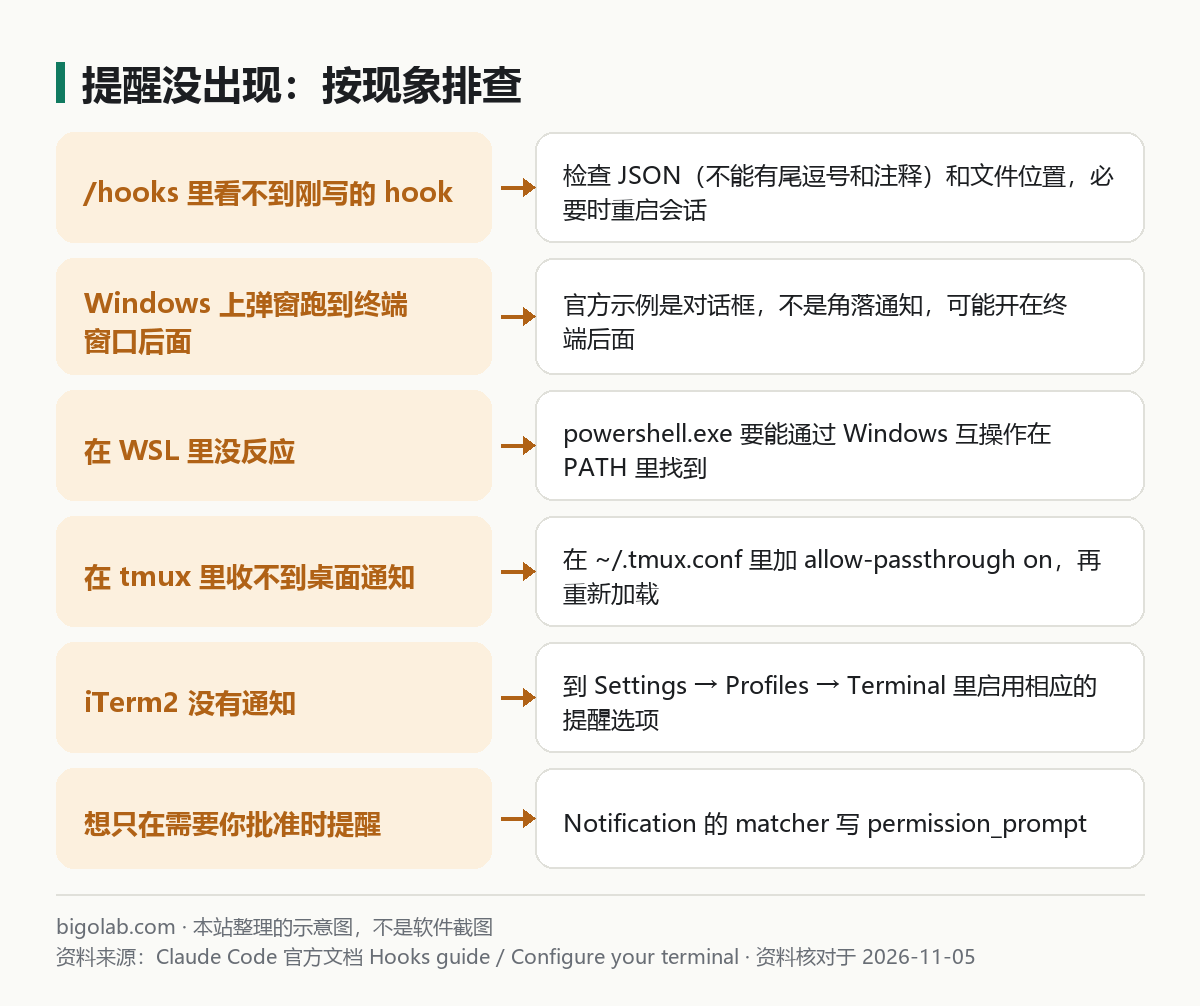
图:本站根据 Claude Code 官方文档:Automate actions with hooks 与 Configure your terminal 整理的示意图
/hooks里看不到:确认 JSON 有效,尾逗号和注释都不允许;文件在~/.claude/settings.json(全局)或.claude/settings.json(项目);改完通常自动生效,几秒内没出现就重启会话;- Hook 在列表里但没执行:检查事件名和 matcher 是否一致,matcher 区分大小写;
- 看到
blocking because Git Bash wasn't found:这是 Windows 上没找到 Git Bash,失败或超时的 hook 还拦住了工具调用,官方在 Hooks 参考页有「Failed hooks on Windows without Git Bash」一节说明修法; - 在 tmux 里收不到桌面通知:官方说默认情况下通知和进度条到不了外层终端,要在
~/.tmux.conf加set -g allow-passthrough on,再运行tmux source-file ~/.tmux.conf; - iTerm2 没通知:要在 Settings → Profiles → Terminal 里勾选 Notification Center Alerts,再点 Filter Alerts 启用 Send escape sequence-generated alerts;
- 还是没有,确认终端程序在系统设置里有通知权限。
通过 SSH 登录远程服务器时,官方说桌面通知能到达你本机,所以远程会话也能提醒你,详见 /guides/claude-code-ssh-remote-server。
常见问题
Q:Hook 会消耗额度吗?
Hook 是在本机运行的 shell 命令,官方没有说它消耗模型额度。额度怎么算见 /guides/claude-usage-limits。
Q:能不能用手机收提醒?
本文没有核对官方的手机通知功能的细节,需要的话以官方文档为准。
Q:和状态栏有关系吗?
没有。状态栏是显示信息的,见 /guides/claude-code-statusline-model-context-usage。
相关教程
- /guides/claude-code-hooks:Hook 的完整写法
- /guides/claude-code-settings-json:settings.json 位置与优先级
参考资料
- Claude Code 官方文档:Configure your terminal — https://code.claude.com/docs/en/terminal-config
- Claude Code 官方文档:Automate actions with hooks — https://code.claude.com/docs/en/hooks-guide
- Claude Code 官方文档:Hooks reference — https://code.claude.com/docs/en/hooks
0 条评论
还没有评论,来抢沙发~