
结论先说
- 先用
app.json锁死scheme、双端包名与 Config Plugins,再让 Codex 写页面逻辑。Expo Router 会把app/下的文件结构直接映射为深链路由(例如app/orders/[id].tsx对应myapp://orders/42),提前定好路由命名和原生插件清单能大幅减少后续重配成本。 - 本地推送与深链联动必须兼顾「前台展示」「后台唤醒」和「冷启动直达」三种状态。漏写
setNotificationHandler会导致前台无横幅,漏写getLastNotificationResponseAsync则会让 App 完全退出后点击通知只停在首页。 - 涉及原生插件与通知联调时,应尽早切到 EAS Development Build,不要死磕 Expo Go。Expo Go 适合快速验证纯 JS 页面,但自定义原生权限、通知图标、深链关联域名与打包产物一致性最终都要在开发构建(
developmentClient: true)真机上验真。 - 把外部深链参数一律视为不可信输入。在通知
data.url或外部链接触发router.push()之前,务必做路径前缀白名单校验,防止恶意链接把用户导向内部调试页或非法拼接参数。 - 同时排查 TypeScript 路由类型、双端原生权限和 EAS 云端构建日志非常消耗 Codex 上下文配额。国内若无境外银行卡,可在本站自助开通 ChatGPT Plus 或额度更高的 ChatGPT Pro 100(10x),多人研发团队可了解 ChatGPT Business 团队定制。
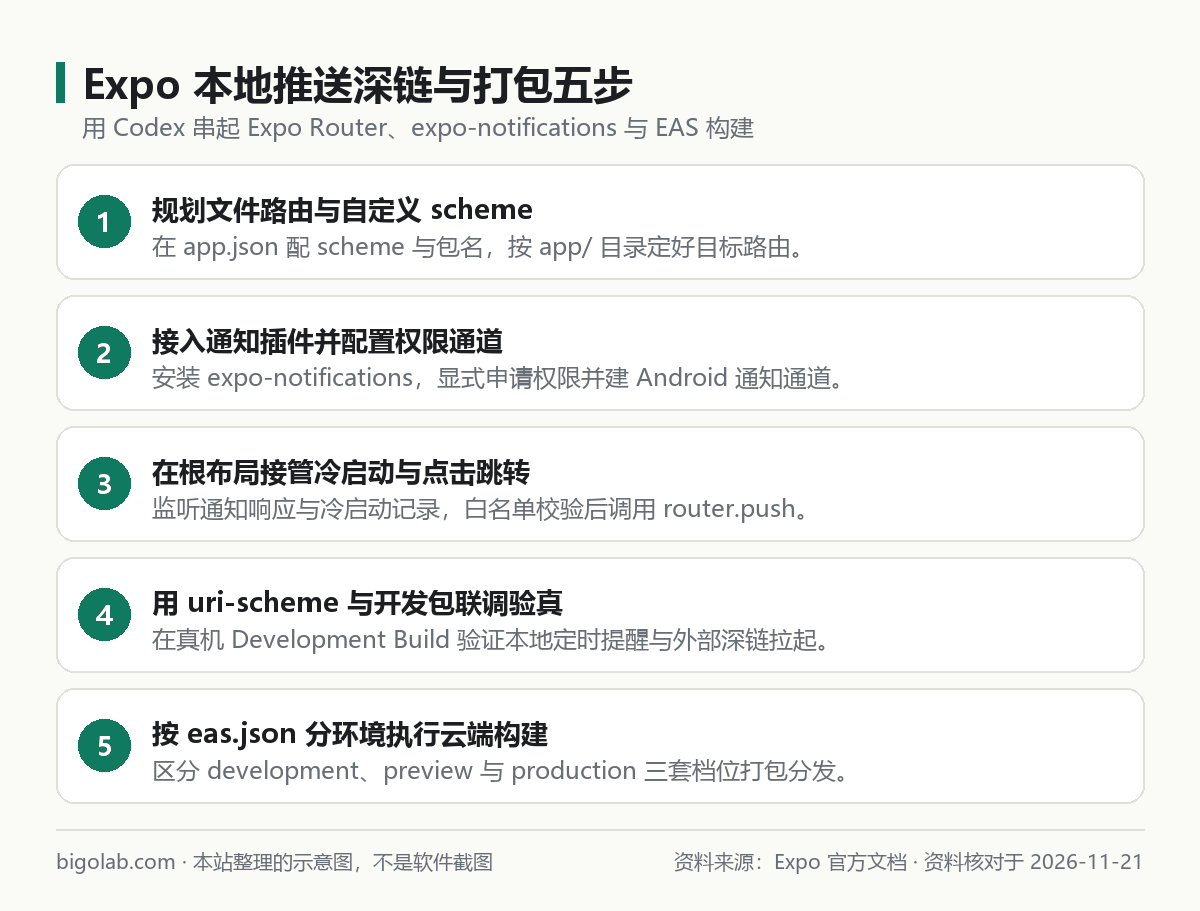
图:本站根据 Expo 官方文档:Expo Router 与 EAS Build 指南整理的示意图
本文根据 Expo 官方文档《Expo Router》《Notifications》《Linking into your app》《Configuring EAS Build with eas.json》整理,资料核对于 2026-11-21。配图为本站整理的示意图,不是界面截图。本站(bigolab.com)不是 Expo、Meta 或 OpenAI 官方网站。
适用于谁
- 熟悉 React 与 TypeScript、准备用 Codex 快速落地一款同时覆盖 iOS 和 Android 的跨端移动应用的独立开发者与前端工程师;
- 在 Expo Router 项目里接入
expo-notifications本地定时提醒、点击通知直达详情页(深链)时,频繁遇到「冷启动不跳页」「Android 不弹通知」「EAS 云端打包报错」的团队; - 想跳过繁琐的原生 Xcode / Android Studio 手工配置,用标准 Config Plugins 与
eas.json跑通测试包和正式包流水线的研发人员。
一、先定好 app.json 与路由骨架,避免 Codex 混写旧 React Navigation 代码
许多 AI 模型在没有约束时会退回去生成复杂的 NavigationContainer 与手工 Linking 映射表。本站建议先在仓库根目录的 AGENTS.md 声明项目采用 Expo Router 文件路由与 Expo Config Plugins,并在 app.json 中固化基础元数据:
json
{
  "expo": {
    "name": "HabitPulse",
    "slug": "habit-pulse",
    "scheme": "habitpulse",
    "ios": {
      "bundleIdentifier": "com.example.habitpulse"
    },
    "android": {
      "package": "com.example.habitpulse"
    },
    "plugins": [
      "expo-router",
      [
        "expo-notifications",
        {
          "icon": "./assets/notification-icon.png",
          "color": "#107a60"
        }
      ]
    ]
  }
}
如果后续需要从短信、网页或微信内直接拉起 App,而不止依赖自定义 habitpulse://,则需进一步配置 iOS Universal Links(ios.associatedDomains)与 Android App Links(android.intentFilters 及服务端 assetlinks.json)。若你在 Android 端需要排查原生构建与混淆问题,也可配合参考 Android Studio + Codex CLI 配置与构建指南。
二、本地推送 + 深链直达:一次写全权限、渠道与冷启动跳转
使用 npx expo install expo-notifications 安装与当前 Expo SDK 匹配的依赖后,让 Codex 在两个位置收口逻辑:通知调度封装与 app/_layout.tsx 全局响应拦截。
1. 申请权限、配置 Android 通道并触发本地提醒
ts
// src/services/notifications.ts
import { Platform } from 'react-native'
import * as Notifications from 'expo-notifications'

export async function ensureNotificationReady(): Promise<boolean> {
  if (Platform.OS === 'android') {
    await Notifications.setNotificationChannelAsync('reminders', {
      name: '日常提醒',
      importance: Notifications.AndroidImportance.HIGH,
    })
  }
  const { status: existing } = await Notifications.getPermissionsAsync()
  if (existing === 'granted') return true
  const { status } = await Notifications.requestPermissionsAsync()
  return status === 'granted'
}

export async function scheduleTaskReminder(taskId: string, title: string, delaySec: number) {
  return Notifications.scheduleNotificationAsync({
    content: {
      title: '待办提醒',
      body: title,
      data: { url: `/tasks/${encodeURIComponent(taskId)}` },
    },
    trigger: {
      type: Notifications.SchedulableTriggerInputTypes.TIME_INTERVAL,
      seconds: Math.max(1, delaySec),
      channelId: 'reminders',
    },
  })
}
2. 在 app/_layout.tsx 统一承接冷启动与后台点击
tsx
// app/_layout.tsx
import { useEffect } from 'react'
import { Slot, router } from 'expo-router'
import * as Notifications from 'expo-notifications'

Notifications.setNotificationHandler({
  handleNotification: async () => ({
    shouldShowAlert: true,
    shouldPlaySound: true,
    shouldSetBadge: false,
    shouldShowBanner: true,
    shouldShowList: true,
  }),
})

function isSafeRoute(target: unknown): target is string {
  return typeof target === 'string' && /^\/(tasks|settings)(\/[a-zA-Z0-9_-]+)?$/.test(target)
}

export default function RootLayout() {
  useEffect(() => {
    const navigateFromResponse = (response: Notifications.NotificationResponse | null) => {
      const target = response?.notification.request.content.data?.url
      if (isSafeRoute(target)) {
        router.push(target as never)
        Notifications.clearLastNotificationResponse()
      }
    }

    Notifications.getLastNotificationResponseAsync().then(navigateFromResponse)
    const sub = Notifications.addNotificationResponseReceivedListener(navigateFromResponse)
    return () => sub.remove()
  }, [])

  return <Slot />
}
写完后,先在模拟器或真机命令行直接验证深链映射是否畅通,再测本地推送点击(小步验收闭环思路见 AI 编程 TDD 与验收测试闭环):
bash
# 验证 Android 深链跳转
npx uri-scheme open habitpulse://tasks/42 --android

# 验证 iOS 模拟器深链跳转
xcrun simctl openurl booted habitpulse://tasks/42订阅与开通提示:联调 Expo 原生插件配置、排查 EAS 云端构建日志和修补双端路由兼容问题时,往往需要连续多轮上下文迭代。若日常配额见底,可在本站按账号状态选择 ChatGPT Pro 100(10x) iOS 可覆盖已有 Plus 档 或适合空白号/到期号的 ChatGPT Pro 100(10x) 信用卡自助通道;重度移动应用全栈开发者也可直接升级 ChatGPT Pro 20x iOS 通道。
三、EAS Build 三环境配置与高频报错分流
在项目根目录执行 eas build:configure 生成 eas.json,将开发联调、内测分发与商店正式发版清晰隔离开:
json
{
  "cli": { "version": ">= 16.0.0" },
  "build": {
    "development": {
      "developmentClient": true,
      "distribution": "internal"
    },
    "preview": {
      "distribution": "internal"
    },
    "production": {
      "autoIncrement": true
    }
  }
}日常提交代码前,本站建议让 Codex 先执行 npx expo-doctor 检查原生依赖与当前 SDK 是否版本漂移,再按需运行 eas build --profile preview --platform all。若涉及签名证书(Keystore、Apple Distribution 证书)或含用户隐私的测试推送数据,切勿将私钥文件或敏感用户信息贴进 AI 对话,务必先本地脱敏并通过 EAS Secrets 托管环境变量。遇到打包或跳转异常时,可按下面分流图快速定位。
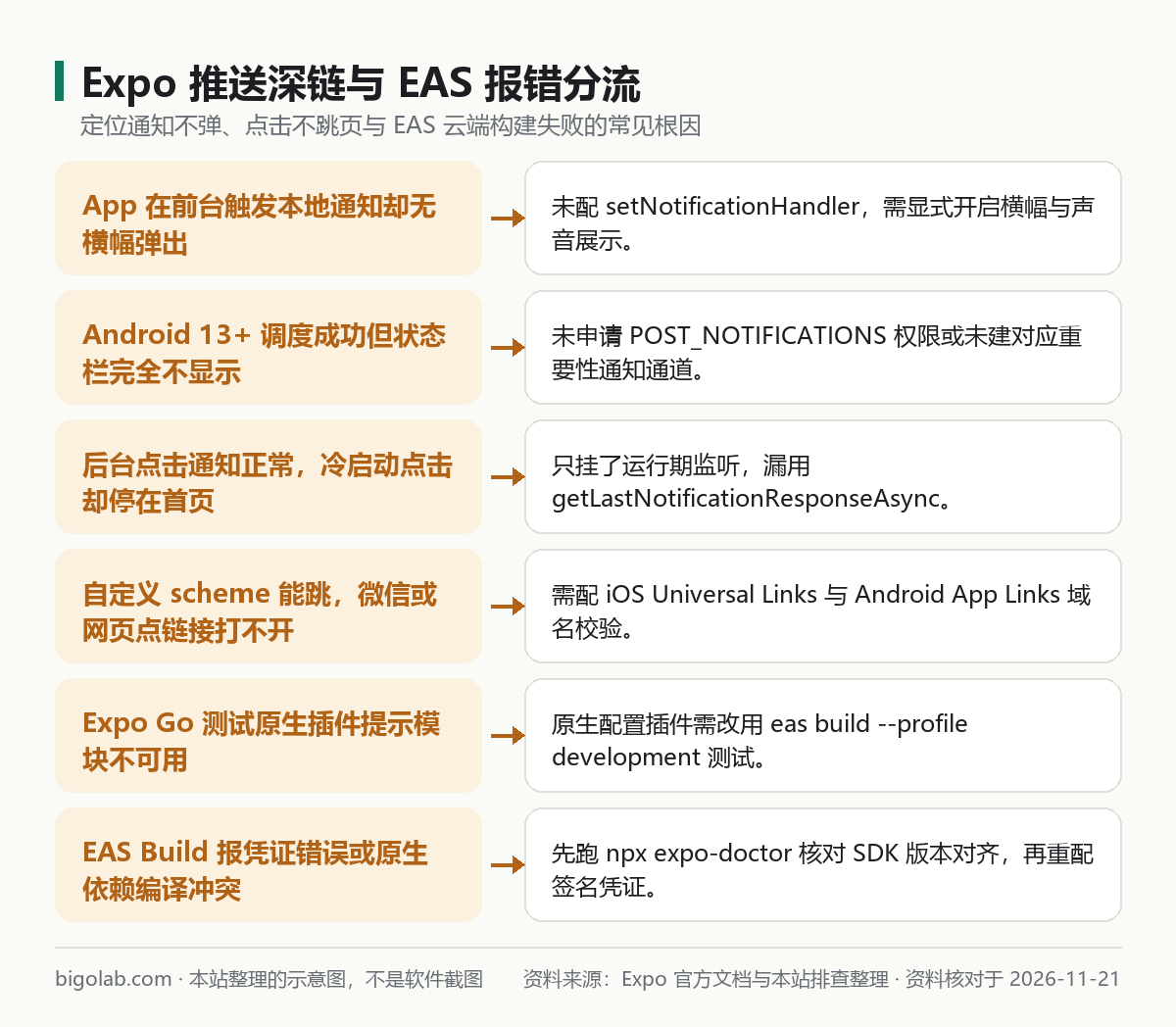
图:本站根据 Expo 官方文档:Notifications 与 EAS Build 及本站排查经验整理
常见问题
问:只做本地定时提醒(不发服务端远程推送),还需要配置 Firebase FCM 或苹果 APNs 证书吗?
答:纯设备端调度的本地通知(scheduleNotificationAsync)不经过远端推送服务器,通常无需配置 FCM/APNs 服务端密钥;但如果后续需要从业务后台发远程 Push,就需要为 Android 接入 FCM、为 iOS 开启 Push Notifications 能力并在 EAS 中绑定推送凭证。
问:为什么用 npx expo install 而不是直接 npm install 安装 expo-notifications?
答:不同版本的 Expo SDK 对应特定版本的 React Native 原生模块 ABI。直接用 npm install 容易拉取过新或不匹配的原生包,导致 EAS 云端 Gradle / CocoaPods 编译阶段报错;用 npx expo install 会自动锁定与当前 SDK 兼容的版本。
问:把项目交付给客户或团队接手时,EAS 凭证和环境配置应该怎么交接?
答:不要把 .p12、.keystore 或明文 API Key 提交到 Git 仓库,应通过文档列出必需的 EAS Environment Variables 键名与构建命令,规范做法可参考 用 Codex 规范外包与客户端源码交接包 以及 ChatGPT Codex 5 倍提效指南。
问:国内没有外币信用卡,或者团队统一采购 Codex / ChatGPT 席位需要开增值税发票,怎么开通?
答:可以前往本站 AI 会员充值总览 按需挑选 ChatGPT Plus iOS 自助充值、ChatGPT Plus 信用卡自助通道 或重度并发适用的 ChatGPT Pro 20x 信用卡通道;若注册 OpenAI 账号卡在手机验证环节,也可了解 Codex 注册手机验证服务。本站支持支付宝、微信支付和 AlipayHK,自助兑换无需提供账号密码,企业团队采购支持开具增值税发票;具体售价以页面实时标价为准,售后执行掉订阅按剩余天数折退、封号不在质保范围的政策。
相关教程
- ChatGPT Codex 5 倍提效指南:上下文卫生与小步验证闭环
- AI 编程 TDD 与验收测试闭环:用 Codex 与 Claude Code 守住代码质量
- Android Studio + Codex CLI 开发 Compose、Gradle 与 ProGuard 实战指南
- 用 Codex 规范外包与客户端源码交接包标准
- ChatGPT 与 Codex 网页端和 CLI 双轨工作流:如何把额度花在刀刃上
参考资料
- Expo 官方文档:Expo Router 概览 — https://docs.expo.dev/router/introduction/
- Expo 官方文档:expo-notifications SDK — https://docs.expo.dev/versions/latest/sdk/notifications/
- Expo 官方文档:Linking into your app(深链与通用链接)— https://docs.expo.dev/linking/into-your-app/
- Expo 官方文档:Configuring EAS Build with eas.json — https://docs.expo.dev/build/eas-json/
0 条评论
还没有评论,来抢沙发~